6-Contributor
July 13, 2022
Solved

Hidden lines visible on section plane/view of an assembly

  • July 13, 2022
  • 1 reply
  • 4390 views

I'm trying to make a section view of a component placed in the middle of an assembly, but I have a problem.

When I create the relative view on the drawing, all the hidden edges/components placed after the section plane are showed but thay should't have been visible (also components/edges placed after the sectioned area).
I have already set on the "view display options" of the "Drawing View" panel:


- Display style: No Hidden

- Tangent edges display style: Dimmed (I tryied also with "None")

- Hidden line removal for xhatches: Yes


any help, please?

Best answer by StephenW

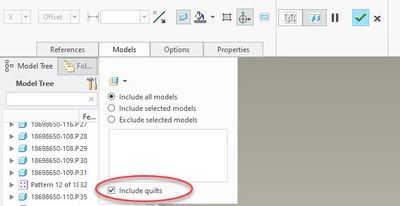
Oh, and I forgot, you have to edit your cross section too to include quilts!! That's another one that baffles me as to why this wasn't default.

StephenWilliams_0-1658243941321.png


1 reply

16-Pearl
July 13, 2022

Are the view properties something like that:


KotomEng_0-1657727779258.png


6-Contributor
July 14, 2022

I have probably a different CREO version, so I see a different view properties panel.

Anyway, as written initally, I have already set:


- Display style: No Hidden

- Tangent edges display style: Dimmed (I tryied also with "None")

- Hidden line removal for xhatches: Yes


I think that I have understood what's my problem.

I have an assembly made of two bodies and a shell. Creo works properly with bodies when it creates the section view, but makes mistakes with the shell, showing all its edges on the section view, and I am not able to fix it. 

16-Pearl
July 15, 2022

I fear that you are not in the correct community. Here you are in the community "Creo Elements Direct" that is a software different from Creo Parametric. You should move your post to the community "Creo Parametric" to have a better chance to get an answer.