Hide sketches from drawings
I need to hide sketches shown in drawing views (sketches not quilts).
I do hide it every time I open the drawing file, so I need a permanent solution.

I need to hide sketches shown in drawing views (sketches not quilts).
I do hide it every time I open the drawing file, so I need a permanent solution.
@ELDAFRAWY wrote:
Hi,
Done all steps in the last reply, but when I hide the layer including the sketches, they are still visible.
Kindly find the part in the attachments with the pictures.
Hi,
I do not have Creo 4.0 M150 installed, therefore I use Creo 7.0.5.0.
There are 2 problems related to your SKETCHES layer.
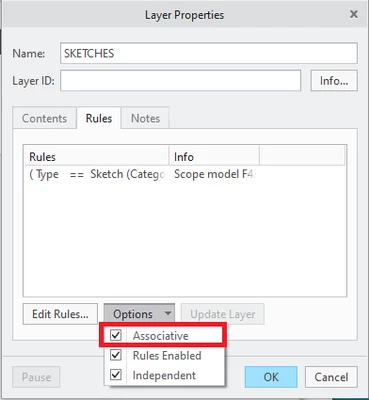
1.] The layer is empty, because you did not set its properties well. Please select Associative property.

2.] The layer is not hidden.
Select layer, RMB > Hide, RMB > Save Status, save part.
No account yet? Create an account
Enter your E-mail address. We'll send you an e-mail with instructions to reset your password.