
14-Alexandrite
April 9, 2025
Solved

Hide Sweep Profile Curve in Model and Drawing

  • April 9, 2025
  • 2 replies
  • 1020 views

Hello,

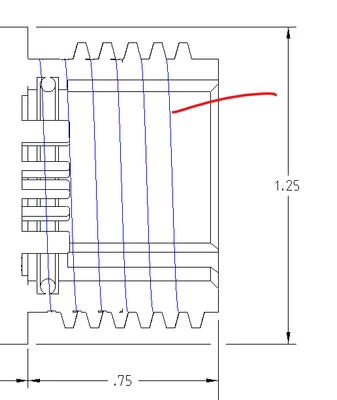
Can someone explain how to hide a sweep profile curve in the model and drawing? Similar topics discussed setting the config.pro option 'mesh_spline_surface' to 'no'. I have tried this and it doesn't seem to work for me. Thank you.
wbottis_0-1744215419942.png


Best answer by wbottis

For some reason this did not work for my newly created layer. So, I tried this with an existing default layer 'DTM_CURVE' and it worked. Thank you.

2 replies

kdirth
21-Topaz I
21-Topaz I
April 9, 2025

You should put it on a layer in the model and hide the layer in the drawing.

There is always more to learn.
wbottis14-AlexandriteAuthor
14-Alexandrite
April 9, 2025

Hi,

I can create a new layer, but then how do I select the curve to add to the layer? Thank you.

kdirth
21-Topaz I
21-Topaz I
April 9, 2025

RMB on layer, select Layer Properties, and select curve on screen or in tree.

There is always more to learn.
Patriot_1776
22-Sapphire II
April 9, 2025

Create Rules-Based layers, and hide them as needed, then SAVE layer status before you save the dwg.