
10-Marble
December 2, 2024
Solved

horizontal leader line missing after changing drawing units from inch to mm

  • December 2, 2024
  • 4 replies
  • 2292 views

Hi Creo Community,


 I have converted the creo drawing file units from inch to mm. upon doing so the fonts of all the text got very minute and smaller. I have fixed it by updating the text values to mm equivalent of inch.


However still in diameter and radius dimensions the horizontal leader line is missing. See attached image. I have highlighted in red.


I would appreciate your help with your suggestion on how I could show it back?

Thanks so much!
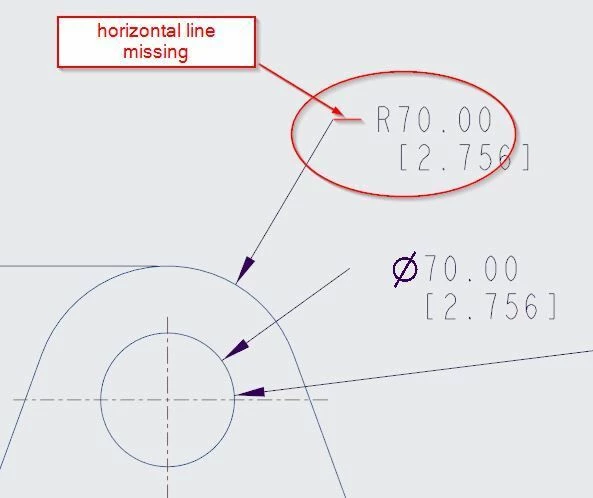
Catalina_0-1733162213346.jpeg


Best answer by kdirth

That looks like dim_text_gap in the DTL has a large value.

4 replies

16-Pearl
December 2, 2024

You are in the wrong forum.


PTC has two CAD systems:    Creo+ and Creo Parametric    and     Creo Elements Direct.


Which makes it confusing.


More, for Creo Elements Direct:

- The 3D software name is Modeling, and

- The 2D software name is Drafting.


For Creo+ and Creo Parametric, use only this tab:

KotomEng_0-1733146838355.png


You should move your post to this community to have a better chance to get an answer.

To move your post, click on the three vertical dots on your initial post and click on "Notify Moderator".


23-Emerald III
December 2, 2024

It might be the Leader_Elbow_Length in your DTL file settings.

hvyas-310-MarbleAuthor
10-Marble
December 3, 2024

Thank you!

I tried to change Leader_Elbow_Length but it doesn't make any difference in this particular situation.

kdirth
21-Topaz I
21-Topaz I
December 2, 2024

It may be that the length of the horizontal leader was adjusted.  Can you hold Shift and drag it out to show a horizontal leader?

There is always more to learn.
hvyas-310-MarbleAuthor
10-Marble
December 3, 2024

Thank you!

I tried to move the dimension to right holding shift. The horizontal leader line did show up but the dimenison moved to further right creating a long distance between leader and the dimension value. (see attached image)


Cab you please advise how to bring this dimension near to leader keeping the horizontal leader line.

kdirth
21-Topaz I
kdirth21-Topaz IAnswer
21-Topaz I
December 3, 2024

That looks like dim_text_gap in the DTL has a large value.

There is always more to learn.
mkajdan
14-Alexandrite
December 2, 2024

Select the dimension then hold down the SHIFT key to drag the dimensions left or right.  This should expose the missing leader line.

hvyas-310-MarbleAuthor
10-Marble
December 3, 2024

Thank you!

I tried to move the dimension to right holding shift. The horizontal leader line did show up but the dimenison moved to further right creating a long distance between leader and the dimension value. (see attached image)


Cab you please advise how to bring this dimension near to leader keeping the horizontal leader line.
