1-Visitor
March 20, 2024
Solved

How can I change colour of a part in the section view?

  • March 20, 2024
  • 2 replies
  • 3707 views

Hi folks, 

I am quite new to Creo so please this might be a very silly question. I am using Creo 8.0.

How do I change colour of a part in a section view?

In the 'model'  mode, when I create a section view, the section face of the part is different from the original model colour. Can I change the colour freely or there's a default colour? If this is not possible, can I change the colour in a section view on the drawing? 

Thanks indeed!

Best answer by tbraxton

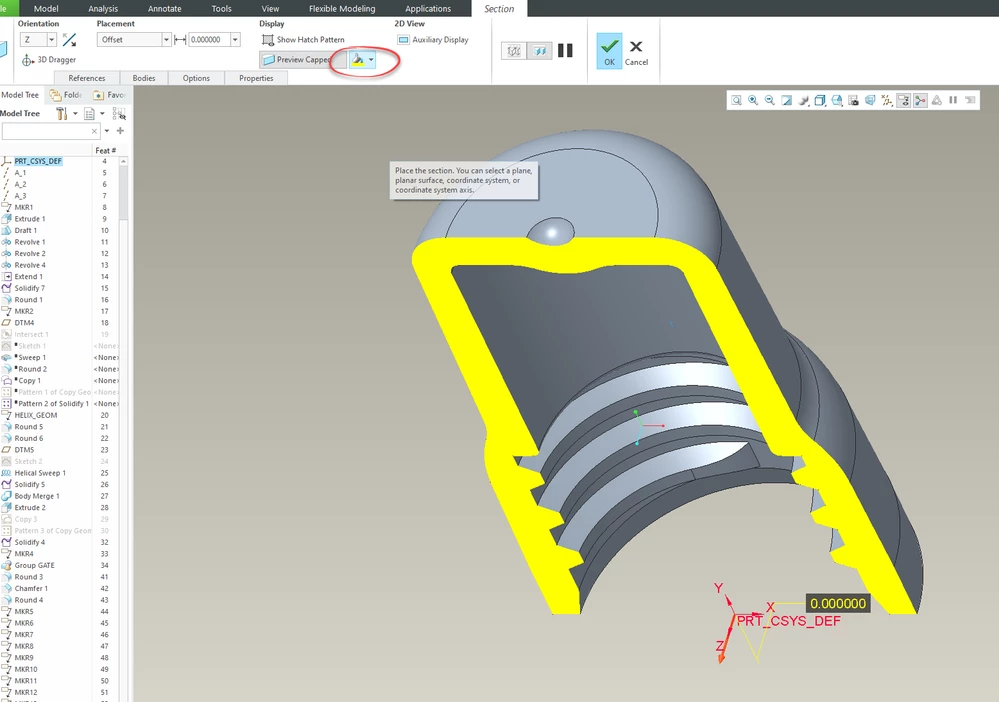
Yes, you can change the color of the section surfaces. In the section definition there is an option to set the color of capped surfaces.


tbraxton_0-1710962300285.png


2 replies

tbraxton
22-Sapphire II
tbraxton22-Sapphire IIAnswer
22-Sapphire II
March 20, 2024

Yes, you can change the color of the section surfaces. In the section definition there is an option to set the color of capped surfaces.


tbraxton_0-1710962300285.png


23-Emerald III
March 20, 2024

In the drawing, in the x-hatching menu, change hatch to Hatch Pat. 

Then you have the color option

StephenW_0-1710964527919.png