These errors are very common if you are saving copies of data that have external references between components. Creo is warning you that the part you want to copy has parents in the current assembly. Basically, something in your part is referencing another component. You should be able to see this in the reference viewer.
In this example, I have two parts inside an assembly. The hole in the white part references the axis in the blue part.
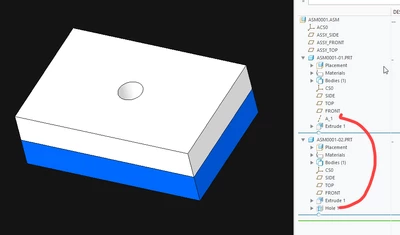
Since the hole in the white part is referencing the axis in the blue part, the white part requires the blue part to regenerate. It also requires the assembly because the reference between the white and blue parts is stored at the assembly level (ASM0001).
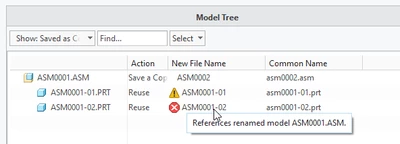
The error appears because Creo is trying to protect you from creating an assembly that can't fully regenerate on its own. If you simply assemble the white and blue parts into a new assembly, there's a chance that the hole in the white part would fail because the new assembly doesn't store the reference between the two parts. The original assembly does.
The errors will only appear if you attempt to reuse the components in the new assembly. If you save a copy, the part is renamed and the references in the renamed components are rerouted through the new assembly. Saving a copy is generally the right answer when you see these errors.
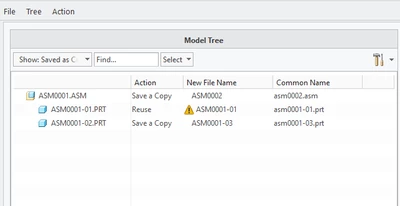
In your case though, you want to reuse the component as is. This is where replace by copy becomes handy. You can temporarily save a copy of the errored component and then immediately replace it in the new assembly with the original. There are a few alternative options as well:
- Remove the external references - use reference viewer to identify the parent components to the component in question and remove them
- Suppress everything in the assembly before copying (drag the insert bar up) - this tricks Creo into not checking the references. The result is a new assembly with all the same contents as the original. Be very careful with this method! This method can cause failures as the rerouting references step is skipped.
I hope this helps!

