
14-Alexandrite
December 19, 2021
Solved

How can you add the item reference number from BOM to the respective component drawing?

  • December 19, 2021
  • 3 replies
  • 2357 views

I want to use the item reference numbers that are created with the BOM ballons of my assembly drawing to indicate which part is shown in a component drawing.
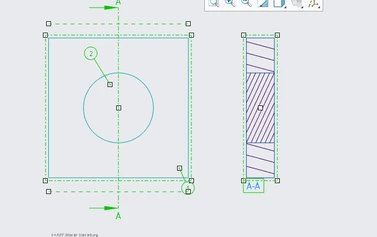
Assembly_drawing_with_bom_balloons.PNG

But when I want to add the element number note, only code is generated in that note, as shown in the attached picture.
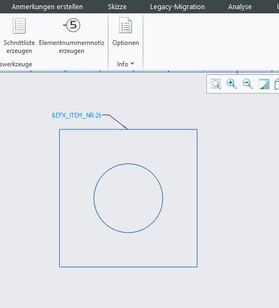
component_drawing.PNG

This is what I would have expected it to look like:
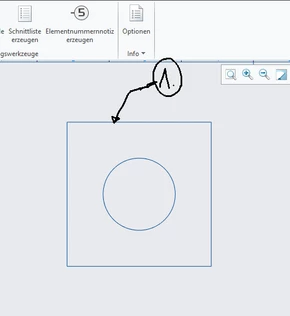
what_I_expect_edited.png

Does anyone know how to fix this, or whether there is any other way or workaround to display the same item reference number that is used in the BOM in the respective part drawing?


Thank you for any answers and help.

Best answer by kdirth

When detailing parts within an assembly drawing, I have always used the part number, which is also in the BOM, to label the part drawings.


If you need to use the item number, you will need to fix the index and manually place balloons.

3 replies

24-Ruby III
December 20, 2021

Hi,

rpt.index can be displayed in assembly drawing, only. Creo does not enable you to show it in part drawing.

19-Tanzanite
December 20, 2021

Look for using "FIND NUMBERS" and implementing them using component-level parameters.  So instead of Pro/REPORT generated #s, the balloons will use the parameter values.  These parameters values can come from Windchill.  It's fairly complicated, but doable.

24-Ruby III
December 21, 2021

@pausob wrote:

Look for using "FIND NUMBERS" and implementing them using component-level parameters.  So instead of Pro/REPORT generated #s, the balloons will use the parameter values.  These parameters values can come from Windchill.  It's fairly complicated, but doable.


Hi,

unfortunately component-level parameters are not available in part drawing.

kdirth
21-Topaz I
kdirth21-Topaz IAnswer
21-Topaz I
December 21, 2021

When detailing parts within an assembly drawing, I have always used the part number, which is also in the BOM, to label the part drawings.


If you need to use the item number, you will need to fix the index and manually place balloons.

There is always more to learn.