1-Visitor
May 26, 2015
Solved

How do I rotate an object in a creo drawing?

  • May 26, 2015
  • 2 replies
  • 63888 views

Hello everyone,


I have my front view set up in the drawing, but I want to rotate it. About an axis or a feature, either way. How would I accomplish that?

Best answer by Mahesh_Sharma

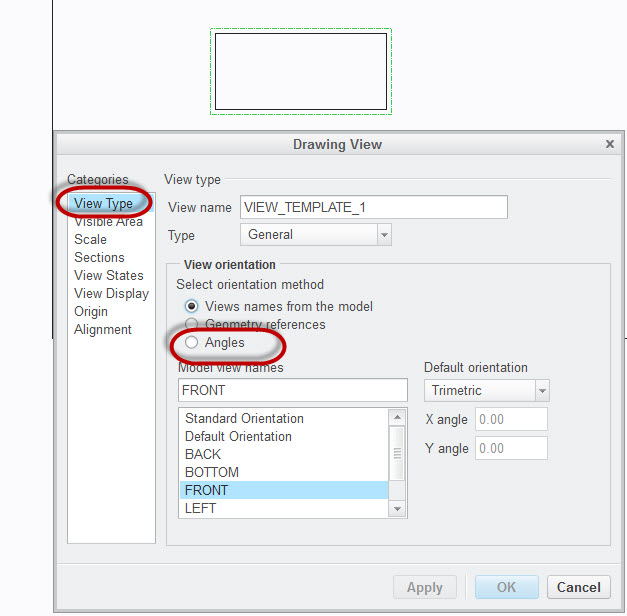
Select View > Right click > Properties.

View.jpg

2 replies

Mahesh_Sharma
22-Sapphire I
May 27, 2015

Purva,

You can try using View orientation in view properties, possibly View orientation > Angle will help you.

pjuvekar1-VisitorAuthor
1-Visitor
May 27, 2015

View.png

Hi Mahesh,

I cannot seem to find the Angle option. Under view, there's view>orientation. I can't find the angle command. Could you help me with that? Thanks a ton!

12-Amethyst
May 27, 2015

select your view you wish to re-orient and RMB > properties

your options become available

pjuvekar1-VisitorAuthor
1-Visitor
June 17, 2015

Hi Mahesh,

I apologize for not marking the correct answer earlier. The answers in the this post definitely helped me, thanks to you and Ron St. Pierre!