4-Participant
April 4, 2024
Solved

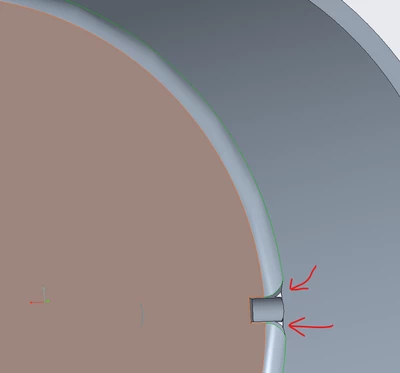
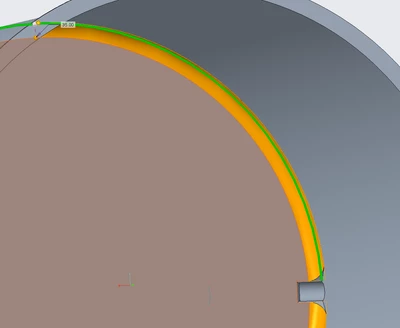
How do I round this edge without other edges dissapearing?
  • April 4, 2024
  • 3 replies
  • 1066 views

Screenshot 2024-04-04 122855.png

Screenshot 2024-04-04 122934.png

Im trying to round the inner bottom edges of this tank. It has this small pipe leading out. When I apply round to it. It opens on either side of my pipe. How do I not have this? It doesnt show the holes in the preview but when I click accept it does. Im on creo 10.

Best answer by KenFarley

This seems to be a classic example of how the order of features can make things difficult. If it were me, I would put the rounds on the bottom edges, and then put in the hole feature, not the other way around. Kind of a case of modeling things the way you would actually build them.

3 replies

KenFarley
KenFarley21-Topaz IIAnswer
21-Topaz II
April 4, 2024

This seems to be a classic example of how the order of features can make things difficult. If it were me, I would put the rounds on the bottom edges, and then put in the hole feature, not the other way around. Kind of a case of modeling things the way you would actually build them.

24-Ruby III
April 4, 2024

Hi,

if it is possible then upload your model.

tbraxton
22-Sapphire II
April 4, 2024

The method of @KenFarley will probably work. Enclosed is a Creo 7 model with an alternate method to achieve this in part mode using multi-body.


tbraxton_0-1712231866096.png