
15-Moonstone
January 12, 2023
Question

How do you automatically show model or assembly annotation feature note when creating new drawing?

  • January 12, 2023
  • 3 replies
  • 5274 views

Hi,

How do you automatically show model or assembly annotation feature note (General Notes) that won't be tied to a drawing view when creating new drawings?

I basically want the note contained in the annotation shown in the image below to be automatically shown on the drawing format in the upper left corner as general notes when a user creates a new part or assembly drawing.  Currently you have to change to the annotate tab, expand the feature tree, pick the annotation note, right click and click show for every drawing that's created.

Would there be a way to show this annotation at the format level or in a drawing template so that it's automatically shown when a new drawing created?
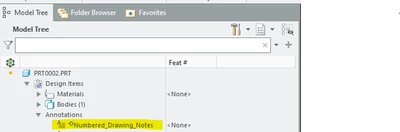
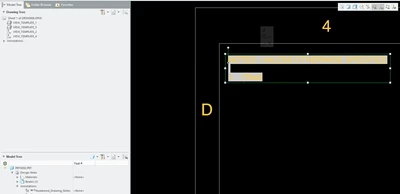
 

danders238_1-1673530840646.png

danders238_2-1673531575788.png

Thanks for any help you can provide,

Don A

3 replies

16-Pearl
January 12, 2023

I think you might want to look into drawing templates. Take a look at this article.


Tdaugherty_0-1673538910465.png


15-Moonstone
January 12, 2023

I have looked at using drawing templates. Haven't found a way to configure the drawing template to automatically pull the annotation from the model and place it on the drawing using a drawing template. 

Can anyone point me to a help document that explains how to do it using templates?


Thanks

Don A

15-Moonstone
January 12, 2023

Note: I need the solution to work when creating a drawing from a part or assembly file!

Don A

16-Pearl
January 13, 2023

I think you have two ways of doing this:

1. Create a mapkey that will display an annotation from the model in the drawing, so you don't have to go through all the clicks.

2. Put the note contents in the parameter (you'd probably need to add this parameter to the model template for consistency) and then create a note referencing the parameter value in model (or even in model template, if it's supposed to always be shown in every model) and in format/drawing template. And then you can still double-click the note displayed (in model or in drawing) and edit its text, which will essentially change the parameter value for that given part.

15-Moonstone
January 23, 2023

Needing a way to do this automatically using a drawing template or drawing format.

Don't want to have to generate a mapkey for every drawing format and size that we use.

The general notes will be on every drawing located in the upper left corner.

19-Tanzanite
February 6, 2023

Well, one way I can think of doing this is:


1) make / revise your company templates or formats and include in them a callout for displaying a model parameter:

pausob_0-1675708065880.png


2) In your model, create a parameter (of type NOTE) and its value will be the ID of the model note that you are going to be displaying in your drawings.

(here I called this parameter GENERAL_NOTES) 


3) now when you use the template to make the drawing of the model, the designated note will show up "automatically".

pausob_1-1675708183937.png


You / your users will have to designate which note will be shown by populating the value of the GENERAL_NOTES parameter in your (legacy) models.


If your start parts have this parameter with its value pointing to the included standard note, then this will be pretty much hands-off automatic for new models...


Hope that makes sense.  Above example shows a template which has a table and a note showing how the result shows up.

I haven't tried it with a format, but I expect similar results.


PS. this is how my example note looks like in the part model:

pausob_2-1675709085754.png

- the GD&T feature control frame doesn't come through very well on the drawing.

So seems there will be limitations, but should work for basic text.

15-Moonstone
February 6, 2023

Are you using a annotation feature in the model to show the note (attached to the features that the notes control)?
It needs to be an annotation feature due to Model Base Definition requirements and the need for automated inspection information extraction.

I still haven't found a way to have one or 2 annotation notes automatically displayed by drawing template or format.

Don A

19-Tanzanite
February 6, 2023

Yes, I'm using annotation features.  The example I show uses a flat-to-screen note element but the method will work with notes with leaders and attached to model geometry.  Here's the composite (redacted) screenshot of the model that is being shown on my example template / drawing:

pausob_0-1675711490384.png


To be clear, you understand what Note type parameters are?  And you have tried to use them but they don't work for your application?