6-Contributor
January 21, 2022
Solved

How to add units to restricted parameters?

  • January 21, 2022
  • 1 reply
  • 3020 views

Hi,

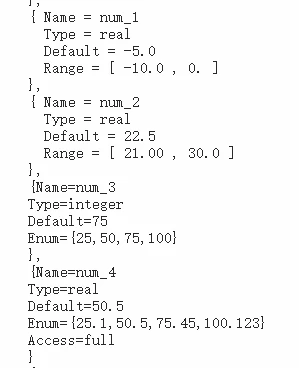
When I learn about restricted parameters, I notice that there is no showcase about how to correctly add <quantity type> and <unit>. I have attempted to create some files but they are not accepted by Creo.

Can anyone give me some examples about adding quantity type/unit?
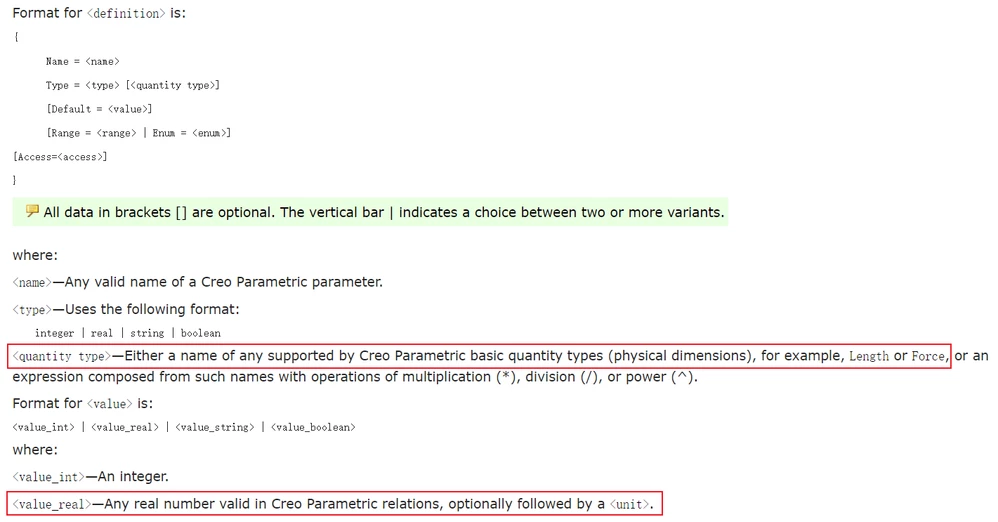
Snipaste_2022-01-21_14-09-24.pngSnipaste_2022-01-21_13-38-16.png


Best answer by MartinHanak

@Luc_G wrote:

Hi,

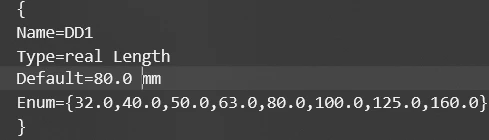
Below is my new attempt but failed to be read by Creo. 
Snipaste_2022-01-24_08-51-26.png

When I delete "Length" & "mm" it is read by the system but when I update my exsisting parameter DD1 it says wrong type or unit.


Hi,

every Enum value must be followed by mm.

1 reply

24-Ruby III
January 21, 2022

Hi,

please ask PTC Support and let us know.

21-Topaz I
January 21, 2022

Hello @Luc_G 


Before creating the restricted parameter file, just create a simple parameter from the User Interface, Right click on it, and select Insert Unit.

After that, you will see the Quantiy and the Unit syntax expected in the restricted parameter file definition.


For instance, if you insert "kg" as "unit" from drop down list, you'll see that unit will be kg (without surporise), and Quantity is Mass:

sacquarone_0-1642762058219.png


Once having acknowledged this information, build your restricted parameter file using syntax according to guidance from article 123992.


Hope this helps,


Regards,


Serge


24-Ruby III
January 21, 2022

Additional note ...


This definition is correct ... the value contains the decimal point and the decimal part of the number

{

Name = MASS_KG
Type = real Mass
Default = 0.0 kg
}


This definition is not correct ... the value does not contain the decimal point and the decimal part of the number

{

Name = MASS_KG
Type = real Mass
Default = 0 kg
}