
4-Participant
January 14, 2025
Question

How to Automatically Display the Number of Unique Component Types in a Drawing Using Parameters

  • January 14, 2025
  • 3 replies
  • 1185 views

Hello,

I am looking for a way to calculate the number of unique component types (excluding duplicates) in an assembly and automatically display this value in a drawing using parameters in Creo Parametric.

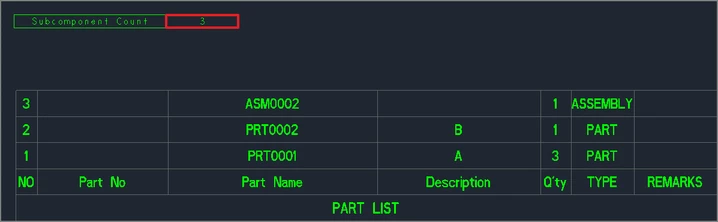
The goal is to achieve something like the red box in the attached image, where the number of unique components (e.g., ) is calculated and shown. If a part is used multiple times (e.g., the same part number), it should still be counted as one unique type.3

Questions:

  1. How can I create a parameter that calculates the number of unique component types in an assembly?
  2. What steps are needed to insert this parameter into a drawing?
  3. Are there any additional Relation settings or tips required to make this work?
JK_12004273_0-1736839525811.png


Example Image Description:

  • The red box in the image shows where I want the number of unique component types (e.g., 3) to appear in the drawing.

I would greatly appreciate detailed steps or examples to help implement this. Thank you in advance!

3 replies

24-Ruby III
January 14, 2025

Hi,

I doubt that Creo can insert the maximum value of rpt.index into a drawing or model parameter.

4-Participant
January 14, 2025

I tried to apply it that way, but I failed.

24-Ruby III
January 14, 2025

@JK_12004273 wrote:

I tried to apply it that way, but I failed.


Hi,

that is obvious ... rpt.index is "visible" inside repeat region, only. Additionally, the model parameters are read-only inside repeat region.

Van_AG
15-Moonstone
January 14, 2025

Maybe using ModelCHECK in an assembly...?
There are ASM_BOM and UNQ_COMPONENTS checks.
You can parse ModelCHECK report and extract the check's values...


23-Emerald III
January 14, 2025

ModelCheck will give you this information:


UNQ_COMPONENTS
Number of unique parts and sub-assemblies: 281
 
ASM_BOM
Bill of material: 5346

23-Emerald III
January 14, 2025

You probably have other reasons, but on this drawing, the balloon number (rpt.index) is that counter???

4-Participant
January 15, 2025

Yes I can mark the last rpt.index number over there.