2 replies

tbraxton
22-Sapphire II
22-Sapphire II
March 11, 2025

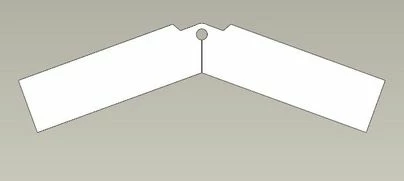
Check out the planar bend feature. It will enable the bend in the plane of the part as you need. I am not sure how to control the distortion of the relief "hole" with this though as it will stretch using this technique. You would need to account for the stretch that occurs from this bend.


A planar bend forces the sheet metal wall around an axis that is normal (perpendicular) to the surface and sketching plane. 

To Create a Planar Bend


It may be easier to model the part in the bent state and unbend it. Here is the result of a quick attempt using a planar bend. You can see the "stretch" in the bend zone in the second picture.


tbraxton_0-1741695640390.png


tbraxton_1-1741695649913.png


3-Newcomer
March 12, 2025

In my requirement the relief hole can stretch and other area dimension should not change. Thanks for your response

16-Pearl
March 11, 2025

Hi @KJ_10126846 

I did it with warp feature.

ProFeature_1-1741707569114.png


ProFeature_0-1741707427121.png


3-Newcomer
March 12, 2025

This may work, but I couldn't get it right. Currently, I'm using Creo 9.0.1.0, and the file you shared is not opening. Could you please explain how you created it?  Thanks in advance.

16-Pearl
March 12, 2025

Hןi @KJ_10126846 

Try doing it according to these settings. Note that it may be in different dimensions than yours.


ProFeature_0-1741792449192.png