
1-Visitor
April 11, 2022
Solved

How to Call Port Parameters from Creo Schematic within Creo Parametric

  • April 11, 2022
  • 1 reply
  • 5697 views

I am using Creo Parametric Release 5.0 and Datecode5.0.0.0

Hello,

I am relatively new to using Creo Parametric to build harness models. I am using Creo Schematics to generate 2D wiring diagrams and then exporting an XML file into Creo Parametric. Within Creo Schematics, for a connector you have parameters associated with the component, parameters associated with the port of the connector, and parameters associated with the wires (spool). I am having trouble calling port parameters within Creo Parametric. I have been using the following guide:

http://support.ptc.com/help/creo/creo_pma/usascii/index.html#page/electrical_design%2Fcable%2Freport_params_for_harness_asms_and_harness_mfg_drawing.html%23

I have tried nearly all combinations but I cannot seem to report the custom port parameters within my BOM tables. I think that the call

&asm.mbr.connprm.pin.

should work but I am only able to call the basic parameters like entry port and name and not any of the custom ones defined in Creo Schematics. I am able to call custom parameters associated with the connector as well as the spool but just not for the port. If you could please help me with this issue, I would be very grateful.

Thanks!

Eric
Best answer by Lars_F

Hi,


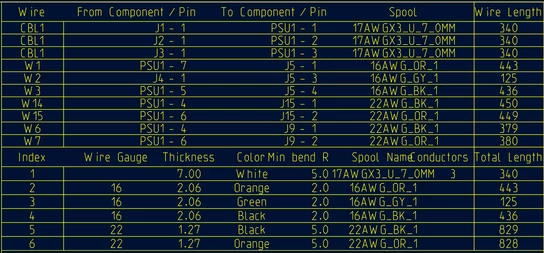
In our drawings we use BOM tables as shown below (one example table)...

After routing your wires and cables you should have one or more cable parts. Usually we create a drawing for each cable part. For the BOM table we set the "Repeat Region -> Model/Rep" to be the cable part (e.g. mycable.prt). Then the table may look like this... Most parameters come from the schematic except the lenght.


trainee_0-1649751365471.png


The report parameters for each item above (as shown in properties dialog for each region)

Harness Connection Table Items
==============================
Wire           - &harn.run.name
From Component - &harn.run.cond.from.conn.name
Pin            - &harn.run.cond.from.pin.name
To Component   - &harn.run.cond.to.conn.name
Pin            - &harn.run.cond.to.pin.name
Spool          - &harn.run.spool.name
Wire Length    - &harn.run.len[.0]


Index          - &rpt.index
Wire Gauge     - &harn.spool.WIRE_GAUGE
Thickness      - &harn.spool.THICKNESS[.2]
Color          - &harn.spool.COLOR
Min bed R      - &harn.spool.MIN_BEND_RADIUS[.1]
Spool Name     - &harn.spool.name
Conductors     - &harn.spool.NUM_CONDUCTORS
Total Length   - &harn.spool.len[.0]


I haven't been very successful either in using the "Report Parameters for Harness Assemblies". The tables just fail to show any parameters from the schematic regardless of which assembly I select for the table... and that is why we use the "Report Parameters for Harness Part Drawing".


... Actually I got the assembly to show some of the parameters but they are useless since all we need is of course the "From - To" list for our manufacturer... and maybe that is the "real" why we use the "Report Parameters for Harness Part Drawing". 


Br,

Lars


1 reply

Lars_F14-AlexandriteAnswer
14-Alexandrite
April 12, 2022

Hi,


In our drawings we use BOM tables as shown below (one example table)...

After routing your wires and cables you should have one or more cable parts. Usually we create a drawing for each cable part. For the BOM table we set the "Repeat Region -> Model/Rep" to be the cable part (e.g. mycable.prt). Then the table may look like this... Most parameters come from the schematic except the lenght.


trainee_0-1649751365471.png


The report parameters for each item above (as shown in properties dialog for each region)

Harness Connection Table Items
==============================
Wire           - &harn.run.name
From Component - &harn.run.cond.from.conn.name
Pin            - &harn.run.cond.from.pin.name
To Component   - &harn.run.cond.to.conn.name
Pin            - &harn.run.cond.to.pin.name
Spool          - &harn.run.spool.name
Wire Length    - &harn.run.len[.0]


Index          - &rpt.index
Wire Gauge     - &harn.spool.WIRE_GAUGE
Thickness      - &harn.spool.THICKNESS[.2]
Color          - &harn.spool.COLOR
Min bed R      - &harn.spool.MIN_BEND_RADIUS[.1]
Spool Name     - &harn.spool.name
Conductors     - &harn.spool.NUM_CONDUCTORS
Total Length   - &harn.spool.len[.0]


I haven't been very successful either in using the "Report Parameters for Harness Assemblies". The tables just fail to show any parameters from the schematic regardless of which assembly I select for the table... and that is why we use the "Report Parameters for Harness Part Drawing".


... Actually I got the assembly to show some of the parameters but they are useless since all we need is of course the "From - To" list for our manufacturer... and maybe that is the "real" why we use the "Report Parameters for Harness Part Drawing". 


Br,

Lars


edemilla1-VisitorAuthor
1-Visitor
April 12, 2022

Hi Lars,


Thank you for responding to this post. From what I have gathered, the "Report Parameters for Harness Assemblies" page is used for reporting parameters associated with a specific pin (line item) on a connector while the "Report Parameters for Harness Part Drawing" is used for parameters associated with each wire/cable (line item). I was able to report Port/Pin parameters by using  &asm.mbr.connprm.pin.signal.User_Defined . I found  another post where a user had the same issue as me where &asm.mbr.connprm.pin.User_Defined did not work and &asm.mbr.connprm.pin.signal.User_Defined was offered by PTC as a workaround. Do you by any chance know how to report cavity plugs in a BOM? I cannot figure out how to do this. I would like to report the qty of cavity plugs in my BOM. 


Thanks in advance,


Eric

14-Alexandrite
April 13, 2022

Hi Eric,


We don't use cavity plugs so I can't help there.

I would probably make an assembly of the connector and the plugs... Similar to when we sometimes use ferrules in our connectors...


trainee_0-1649833735169.jpeg


(The demo contains wiring error. The green wire should go to the ferrule). For this connector I can create a bom where I could filter out the connector parts.


trainee_1-1649833869361.jpeg


You might be able to use the connector terminators also for this purpose... but they only exist if you route something into the connector.


Our connector library (schematic) always contains the appropriate crimp contacts (terminators) for that connector. For example if we route 4 wires to 6 position SPOX connector then our terminator table looks as shown here. Although only the "Terminator Name" comes from the schematic. Then we separately load "0870-1039.trm" -file to creo to get the Manufacturer, etc info. I haven't yet figured out how I could get all the terminator info passed to creo in the schematic .xml file... or do we always need a separate terminator table.


trainee_2-1649834460227.jpeg


Br,

Lars