
14-Alexandrite
October 14, 2024
Question

How to change x.x/x.xx/x.xxx etc in 3d space? lower right corners of screen

  • October 14, 2024
  • 2 replies
  • 158584 views

Hi Guys,


How do I change these values? I've seen a post saying its Linear_tol, but this doesnt seem to change anything.


now that we are testing out MBD, I'm noticing that in 3d these are not what I want shown for tolerances.
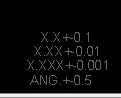
 

dunebuggyjay_0-1728937580098.png


I want it to match my 2d drawings as:

.xxxx =+-.0005

.xxx = +-.001

.xx = +-.005

.x = +-.01


This is what Ive tried added to my config,pro with no luck in changing this. Im assuming my formatting on the config is not correct?

 

dunebuggyjay_1-1728937898233.png


2 replies

24-Ruby III
October 15, 2024

@dunebuggyjay wrote:

Hi Guys,


How do I change these values? I've seen a post saying its Linear_tol, but this doesnt seem to change anything.


now that we are testing out MBD, I'm noticing that in 3d these are not what I want shown for tolerances.


dunebuggyjay_0-1728937580098.png


I want it to match my 2d drawings as:

.xxxx =+-.0005

.xxx = +-.001

.xx = +-.005

.x = +-.01


This is what Ive tried added to my config,pro with no luck in changing this. Im assuming my formatting on the config is not correct?


dunebuggyjay_1-1728937898233.png


Hi,

contents of bottom right corner is hardcoded, you cannot change it. You can verify this information with PTC Support.

14-Alexandrite
October 15, 2024

Is there a way to turn these off then?


I don't want someone looking at my MBD models and thinking this is the tolerance I want. 

24-Ruby III
October 15, 2024

@dunebuggyjay wrote:

Is there a way to turn these off then?


I don't want someone looking at my MBD models and thinking this is the tolerance I want. 


Hi,

I tested different Creo versions. Starting from Creo 6.0 bottom right corner is empty. Up to Creo 5.0 bottom right corner contain tolerance information which is hardcoded and cannot be hidden.

19-Tanzanite
October 15, 2024

The linear_tol settings from your config.pro - these define the tolerances in a brand new, empty part.  And one that is set for the ANSI/ASME tolerancing standard.

AFAIK, there is no way to change these values once you create a model.

So if you are using a "template" part when starting a new part, then you are stuck with whatever settings the maker was using when creating that template.


Note that this schedule of tolerance as a function of # of decimal places isn't shown if you switch to the ISO/DIN tolerancing standard:

pausob_0-1729015360192.png


also, I think your linear_tol settings that match your drawing standard should be:

linear_tol 1 0.01 2

linear_tol 2 0.005 3

linear_tol 3 0.001 3

linear_tol 4 0.0005 4


which shows up as:

pausob_1-1729015836572.png

on my screen.


14-Alexandrite
December 5, 2024

Is this the actual syntax?  doesn't seem to correct and when I type it in as such, I see no change.

   linear_tol 1 0.01 2

   linear_tol 2 0.005 3

   linear_tol 3 0.001 3

   linear_tol 4 0.0005 4


this is what I have but as stated above, seems to have no effect whatsoever.

   angular_tol_0.0 1.000000
   linear_tol_0.0 0.1
   linear_tol_0.00 .02
   linear_tol_0.000 .005
   linear_tol_0.0000 .0005


thanks...

19-Tanzanite
December 5, 2024

Does the same happens if you start with a completely blank part?:

pausob_0-1733433051209.png

pausob_1-1733433134417.png