
10-Marble
November 6, 2022
Solved

How to create a transition surface between two surfaces in the Style Tool?

  • November 6, 2022
  • 1 reply
  • 1644 views

Hello. I model a car with the Style Tool. I need to make a transition surface between two surfaces, but I don't know how to make it in the Style Tool. Here's an image that shows where exactly I need this surface:
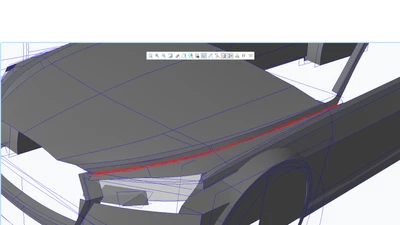
Image 1.png


Best answer by Maskalex

Thanks, but I decided to apply The Round Tool for this purpose.

1 reply

tbraxton
22-Sapphire II
22-Sapphire II
November 6, 2022

One option using style is to create curves on each surface defining the limits of the blend geometry and then build surfaces using those boundaries.


You can create curves on surface or project curves on the surfaces within style to define where the transition will meet each of the reference surfaces.


If possible, use 4 sided surfaces to create the blend surfaces.

Maskalex10-MarbleAuthorAnswer
10-Marble
December 4, 2022

Thanks, but I decided to apply The Round Tool for this purpose.