4-Participant
November 23, 2022
Solved

how to create circles from centre co ordinate data

  • November 23, 2022
  • 2 replies
  • 2163 views

How to create circles from centre co-ordinates data? Radius is same for all circles.

Is there any way in which first we can define the coordinate axes then based on the centre co-ordinate and radius plot the circles. The boundary is a square, basically it is a microstructure consisting of circles inside a square. 

Data is in this form:

 Circle    x          y          r

 1             2          2         1

 2            10         5         1

Best answer by tbraxton

It would appear that you are managing an array of points. The most expedient method is to extract the cartesian coordinates of the circle center points from your data and save it in a .pts file. You can then import this array into Creo to generate the center points. Assuming you have less than 30K (see limit at end of this reply) points to import then using the following method will automate the creation of the center points.


Once you have the center points imported, you can create one sketch of the circle on the first center and then pattern it to all of the imported center points. See the enclosed Creo 7 part file for an example. in the zip file along with a sample .pts file.
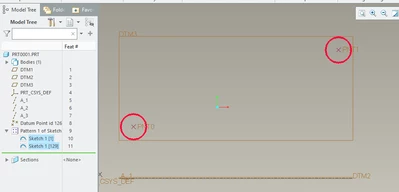
 

tbraxton_0-1669213680456.png


Use the function datum point offset from csys:
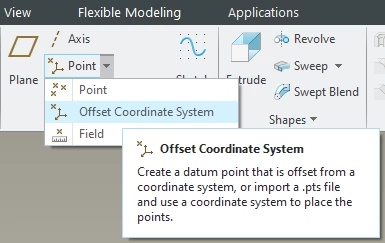
tbraxton_0-1669212517674.png


Import the .pts file with the coordinate data:
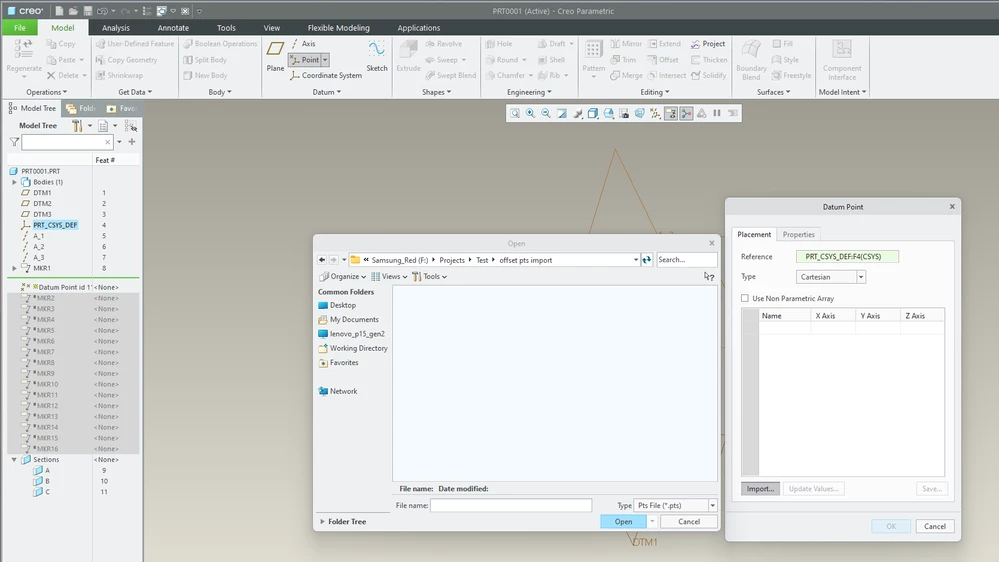
 

tbraxton_1-1669212549275.png


There is a limit on the # of points than can be managed using the offset csys method:

  • Current limit to import datum points through Insert Model Datum > Point > Offset Coordinate System is 30,117.


  • Note: The *.PTS file should only contain X,Y & Z values and the value of Z should be zero
    • Example
      X                         Y                  Z
      -218.1822        11.5048             0                
      -215.7168        30.4058             0

2 replies

KenFarley
21-Topaz II
November 23, 2022

This would be a good example of the type of thing to use a table pattern. You don't specify whether you are just wanting to sketch out the results, or use these circles to cut something, but it's the same basic thing for either.

Check out this bit of help from PTC:


Table Pattern Help 


tbraxton
22-Sapphire II
tbraxton22-Sapphire IIAnswer
22-Sapphire II
November 23, 2022

It would appear that you are managing an array of points. The most expedient method is to extract the cartesian coordinates of the circle center points from your data and save it in a .pts file. You can then import this array into Creo to generate the center points. Assuming you have less than 30K (see limit at end of this reply) points to import then using the following method will automate the creation of the center points.


Once you have the center points imported, you can create one sketch of the circle on the first center and then pattern it to all of the imported center points. See the enclosed Creo 7 part file for an example. in the zip file along with a sample .pts file.


tbraxton_0-1669213680456.png


Use the function datum point offset from csys:

tbraxton_0-1669212517674.png


Import the .pts file with the coordinate data:


tbraxton_1-1669212549275.png


There is a limit on the # of points than can be managed using the offset csys method:

  • Current limit to import datum points through Insert Model Datum > Point > Offset Coordinate System is 30,117.


  • Note: The *.PTS file should only contain X,Y & Z values and the value of Z should be zero
    • Example
      X                         Y                  Z
      -218.1822        11.5048             0                
      -215.7168        30.4058             0
4-Participant
November 24, 2022

Thanks for helping.
