

1-Visitor
November 11, 2016
Solved

How to disable NORMAL constraint

  • November 11, 2016
  • 4 replies
  • 3240 views

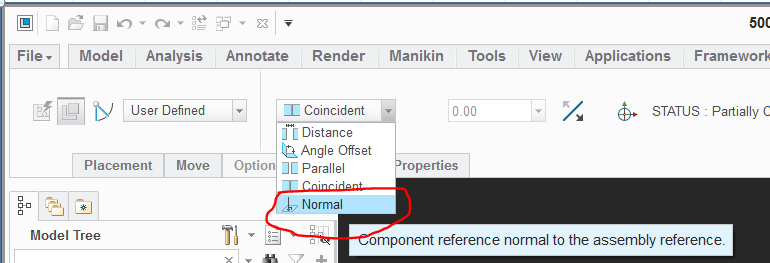
Hi, everyone, I found the Normal constraint in the Creo assembly very annoying, I don't want to use it at all, but seems it is the default Constraint, everytime I choose two surfaces, Normal constraint comes out, so I would like to know if it is possible to disable the Normal constraint, or change the default constraint to Concident?Normal constraint.PNG

This thread is inactive and closed by the PTC Community Management Team. If you would like to provide a reply and re-open this thread, please notify the moderator and reference the thread. You may also use "Start a topic" button to ask a new question. Please be sure to include what version of the PTC product you are using so another community member knowledgeable about your version may be able to assist.
Best answer by dschenken

There are is a config option related to the angle for which a normal constraint applies by default which can help, though just picking Coincident first will avoid it.

see:

comp_normal_offset_eps

Specifies the angle epsilon such that if the desired surfaces are equal or less than the epsilon (in degrees), then a normal constraint will be created (default is 10 degrees)

I expect that when you first add the model you will see that the surfaces start close to normal in the default orientation.

Perhaps a negative value will disable it?

4 replies

dschenken1-VisitorAnswer
1-Visitor
November 11, 2016

There are is a config option related to the angle for which a normal constraint applies by default which can help, though just picking Coincident first will avoid it.

see:

comp_normal_offset_eps

Specifies the angle epsilon such that if the desired surfaces are equal or less than the epsilon (in degrees), then a normal constraint will be created (default is 10 degrees)

I expect that when you first add the model you will see that the surfaces start close to normal in the default orientation.

Perhaps a negative value will disable it?

zli-31-VisitorAuthor
1-Visitor
November 11, 2016

Hi, dschenken, thanks for your replying, it worked unless the angle is 90 degree.

2-Explorer
November 11, 2016

Hello zhihong li

l´m almost sure, there is some hidden config.pro option for this demand. Try to search following link with all hidden options.

Search Pro/ENGINEER config.pro options

Personally have found nothing useful for you

Let us know if you will find some config.pro options.

Regards

Milan Bonka

23-Emerald III
November 11, 2016

I haven't seen the normal constraint in years.

  Re: Assembly constraints

For eliminating the normal constraint from happening by default:

comp_angle_offset_eps 91

comp_normal_offset_eps -1

Add this option to get it to default to coincident instead of distance:

auto_constr_always_use_offset never

2-Explorer
November 11, 2016

As l discovered, there are 3 config.pro options familiar with this problem.

1. auto_constr_always_use_offset --- control whether auto constrait should create offsets.

     YES - Auto canstraint always creates offsets

     NO - Auto constraint snaps align or mate if surfaces are within tolerances

     NEVER - Auto constraint never creates offsets

2. comp_angle_offset_eps --- Specifies the angle epsilon such that if the desired surfaces are equal or greater than the epsilon (in degrees), than angle offset constraint will be created.

3. comp_normal_offset_eps --- Specifies the angle epsilon such that if the desired surfaces are equal or less than the epsilon (in degrees), than angle offset constraint will be created.

Regards

Milan Bonka