
1-Visitor
January 2, 2017
Question

how to do sum quantity seperately for eachpartnumber

  • January 2, 2017
  • 2 replies
  • 3578 views

Greetings everyone!!


I know how to sum the whole table qty. But all I need to know is how to sum  up the qty for each part number in the table.


As in the pic,  I need to calculate the sum for “BK-16-GXL”   in the qty coloumn .I've attached a snap for ur reference...KIndly help me

do i need to use any relation or modify repeat region options ? Let me know
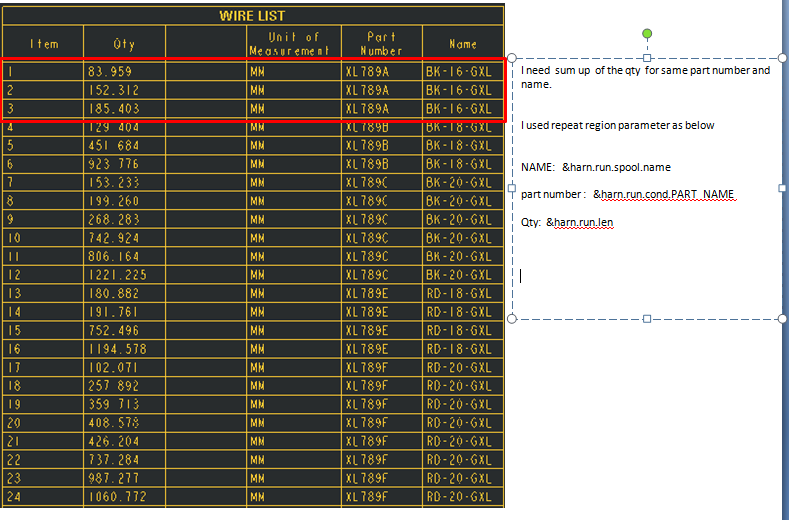


Captu11e.PNG

2 replies

1-Visitor
January 3, 2017

Captu11e.PNG

StephenW
23-Emerald III
January 3, 2017

Go to TABLE - REPEAT REGION - ATTRIBUTES - NO DUP/LEVEL

1-Visitor
January 5, 2017

thank u for ur reply stephens... @stephens williams

in repeat region there is a option to add the total quantity by "SUMMATION"

In that we can add the total quantity and get the answer in single cell.

but i want to add seperately for each color

for example

i want to sum up "BK-16-GXL"  qty as 83.95+152.312+185.403 in a seperate cell...

Chris3
21-Topaz I
January 5, 2017

If summation works then maybe you should just do multiple repeat regions for each part with a filter.

1-Visitor
January 6, 2017

thank u christopher...

but if u never mind...could u please explain elaborately... i cant understand plzzz