
14-Alexandrite
June 1, 2020
Solved

How to Erase Drawing Names from Memory

  • June 1, 2020
  • 1 reply
  • 2191 views

Community,


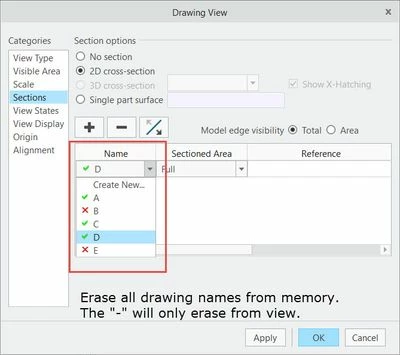
I would like to be able to erase the drawing names from memory in the pull-down under Name.  Selecting the "-" will not erase the names from memory.  Can this be accompolished?  I am using Creo 6.0.0.0, and thanks in advance.
 

drawing view names.jpg


Best answer by StephenW

The screenshot is showing sections that are created in the model. You can go to the model and delete the section.

If you want the view to not use a section, select the "no section" option instead of the "2D cross-section" option

1 reply

StephenW
StephenW23-Emerald IIIAnswer
23-Emerald III
June 1, 2020

The screenshot is showing sections that are created in the model. You can go to the model and delete the section.

If you want the view to not use a section, select the "no section" option instead of the "2D cross-section" option

ThoRig14-AlexandriteAuthor
14-Alexandrite
June 1, 2020

That is correct.  When I created a 2-D cross-section from the drawing, it made a drawing section in the model tree.  Thanks.
