
10-Marble
September 22, 2025
Solved

How to extend a surface to another surface to create a wheel arch?

  • September 22, 2025
  • 2 replies
  • 629 views

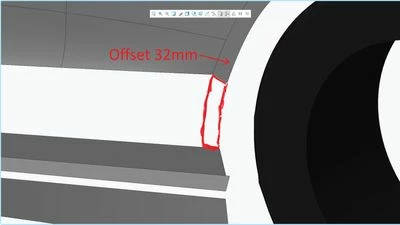
Hello. I'm creating a car in Creo Parametric 9.0. I'm currently modeling a wheel arch and need help. I don't know how to connect the arch to another surface. Here's a screenshot to help you understand what I mean:
A wheel arch.jpg

Best answer by tbraxton

Using core surfacing tools, a boundary blend should work. You will be able to control the surface connections with the boundary blend feature. You will likely need this control to get what you want and extend will not allow this control.


https://support.ptc.com/help/creo/creo_pma/r11.0/usascii/index.html#page/surfacing/surface/To_Create_a_Boundary_Blend_in_Two_Directions.html# 


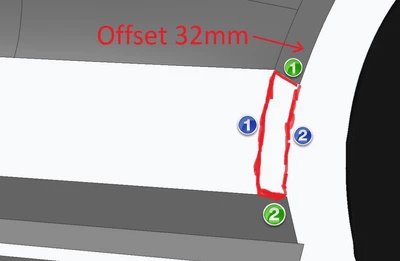
You will need to create 3D curves for the long edges of the 4 sided surface. Use the existing edges of the surfaces (green) for one direction and your new curves for the second direction (blue).


tbraxton_0-1758556367164.png


2 replies

10-Marble
September 22, 2025

Can you just use the "EXTEND" Command such that it intersects the other surface and then MERGE the two quilts together?

Maskalex10-MarbleAuthor
10-Marble
September 22, 2025

Where the "Extend" command is located?

kdirth
21-Topaz I
21-Topaz I
September 22, 2025

Select the edge of the surface to enable the command found in Editing section of ribbon.

kdirth_0-1758556370647.png


There is always more to learn.
tbraxton
22-Sapphire II
tbraxton22-Sapphire IIAnswer
22-Sapphire II
September 22, 2025

Using core surfacing tools, a boundary blend should work. You will be able to control the surface connections with the boundary blend feature. You will likely need this control to get what you want and extend will not allow this control.


https://support.ptc.com/help/creo/creo_pma/r11.0/usascii/index.html#page/surfacing/surface/To_Create_a_Boundary_Blend_in_Two_Directions.html# 


You will need to create 3D curves for the long edges of the 4 sided surface. Use the existing edges of the surfaces (green) for one direction and your new curves for the second direction (blue).


tbraxton_0-1758556367164.png