
15-Moonstone
July 15, 2016
Solved

How to filter for pipe component in repeat region BOM table ?

  • July 15, 2016
  • 4 replies
  • 2232 views

Hi..


I am having a piping assembly, in that we used some other parts rather than pipe component and want to place repeat region bom table without pipe component.

My BOM table should be come without fabricated pipe part.
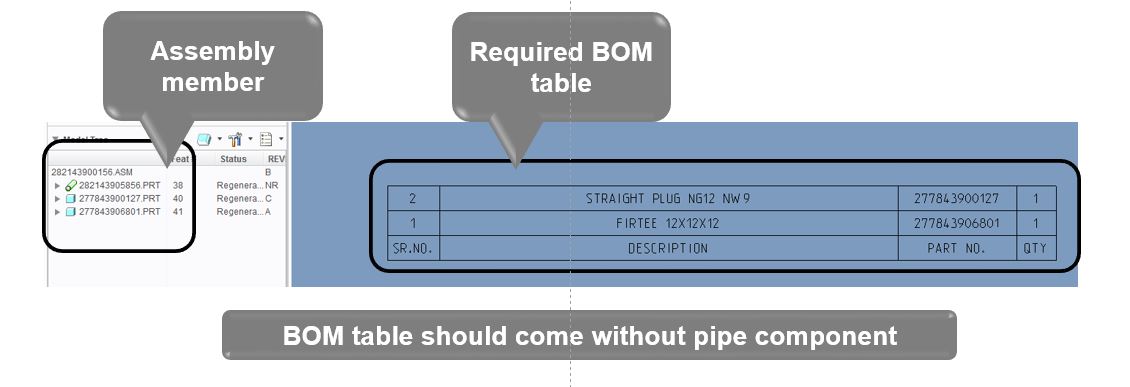
 

Capture.JPG


Regards,

Prashant Pandarkar


This thread is inactive and closed by the PTC Community Management Team. If you would like to provide a reply and re-open this thread, please notify the moderator and reference the thread. You may also use "Start a topic" button to ask a new question. Please be sure to include what version of the PTC product you are using so another community member knowledgeable about your version may be able to assist.
Best answer by SikiF

Hi Prashant,

OK, I understand.

Pipes are identified in Creo as PART type. There is no PIPE Type!

Go and see your pipe parameters. Find one parameter that has same value for all pipes, or it has as less as possible values.

e.g. GRADE. Then filter out by this parameter --> &asm.mbr.grade  != A or &asm.mbr.grade  != A, B, C etc

Hope this helps

4 replies

10-Marble
July 21, 2016

Hi Prashant Pandarkar,

just put on your all piping parts new parameter called for instance PIPING, type of parameter is YES/NO and the parameter value is YES.

Than on your drawing go to table>repeat region>filters  click on table select By Rules and Edit,  then make a filter input as follows: &asm.mbr.piping != YES.

That should remove all your piping components from repeat region.

15-Moonstone
July 21, 2016

Hi Simon,

For this we need to add one additional parameter but we dont want to add any additional parameter as some pipes are in release vault ( PLM constraint).

As i know, we can filter skeleton component and will able to skip in repeat region table because of its type is skeleton.

So is there any way to identify that its pipe component. so we can add it in filter.

Thanks,

Prashant Pandarkar

SikiF10-MarbleAnswer
10-Marble
July 21, 2016

Hi Prashant,

OK, I understand.

Pipes are identified in Creo as PART type. There is no PIPE Type!

Go and see your pipe parameters. Find one parameter that has same value for all pipes, or it has as less as possible values.

e.g. GRADE. Then filter out by this parameter --> &asm.mbr.grade  != A or &asm.mbr.grade  != A, B, C etc

Hope this helps