

1-Visitor
May 13, 2015
Solved

How to hide sweep profile in drawings

  • May 13, 2015
  • 7 replies
  • 5023 views

Hello,

I have a helical sweep and a swept blend that show up in my drawings regardless of what layers I hide. Is there a trick to hiding these so they don't show up in the "no hidden" view?
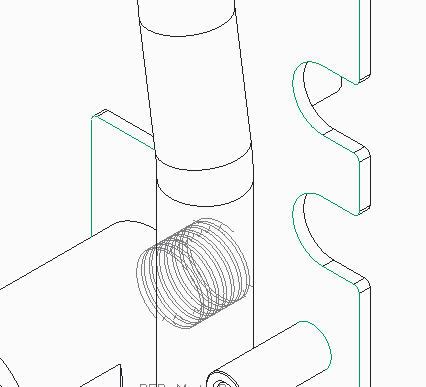
Thanks!


This thread is inactive and closed by the PTC Community Management Team. If you would like to provide a reply and re-open this thread, please notify the moderator and reference the thread. You may also use "Start a topic" button to ask a new question. Please be sure to include what version of the PTC product you are using so another community member knowledgeable about your version may be able to assist.
Best answer by nhanratty

Emery

We suffered a similar issue not so long ago.

Try setting the config.pro option 'mesh_spline_surf' set to no.

Good luck

Neal

7 replies

14-Alexandrite
May 13, 2015

Did you try hiding the feature in the model?

efrey1-VisitorAuthor
1-Visitor
May 14, 2015

I need the feature to be present in other views on the sheet.

17-Peridot
May 14, 2015

You can layer the feature in the model and selectively hide the layer per view in the drawing.

2-Explorer
May 14, 2015

Have you tried creating a rule based layer that grabs all curves? You could then hide that layer. Not sure if they are cosmetics or other, but if you can gather them on a layer you can hide them. Here is a sample layer that collects curves.

5-14-2015 10-28-22 AM.png

If you pick the edit rules you can create rules to grab the desired entities.

5-14-2015 10-28-39 AM.png

I did a video on these in a previous life:

Using Rules to control layers in Creo and Pro/ENGINEER - EAC Tip of the Week - YouTube

nhanratty1-VisitorAnswer
1-Visitor
May 14, 2015

Emery

We suffered a similar issue not so long ago.

Try setting the config.pro option 'mesh_spline_surf' set to no.

Good luck

Neal

efrey1-VisitorAuthor
1-Visitor
May 14, 2015

WHOO HOOO!

Thanks for all the replies, changing the config setting did the trick. I would have never have found that one! Below is the image with the fix implemented for reference;