8-Gravel
September 27, 2023
Solved

How to Measure the Minimum Distance Between Two Holes in Creo?

  • September 27, 2023
  • 2 replies
  • 2658 views

Hello everyone,

I am currently working on a project using PTC Creo, and I've encountered a scenario where I need to measure the minimum distance between two holes in a part. I'm not entirely sure what steps to follow to accurately measure this distance within the software.

I've looked into the 'Analysis' tab and found the 'Measure' option, but I'm not sure if I'm using it correctly. Could anyone guide me through the correct procedure to measure the minimum distance between two holes, either in Part or Assembly mode?

I appreciate any tips or step-by-step instructions you could provide.

Thanks in advance!

 

Best answer by tbraxton

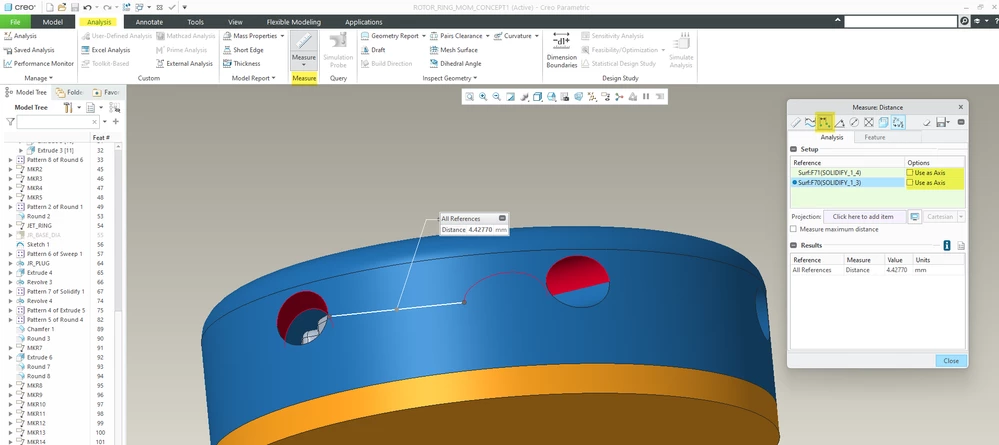
Analysis tab->measure->distance


Unselect the use as axis in the measure tool to get the min distance between the holes.


tbraxton_0-1695838586351.png


2 replies

tbraxton
tbraxton22-Sapphire IIAnswer
22-Sapphire II
September 27, 2023

Analysis tab->measure->distance


Unselect the use as axis in the measure tool to get the min distance between the holes.


tbraxton_0-1695838586351.png


StephenW
23-Emerald III
September 27, 2023

Just to elaborate a little more on @tbraxton  post.

For whatever reason, creo doesn't "auto" expand the measure box. So make sure you expand the "pluses" too and uncheck axis or center (based on what you are picking to measure from/to

StephenW_0-1695838948805.png