
14-Alexandrite
January 27, 2026
Solved

How to modify a symbol in .frm TITLEBLOCK

  • January 27, 2026
  • 2 replies
  • 221 views

How to modify this symbol? I want to change value of  2 PL to .01
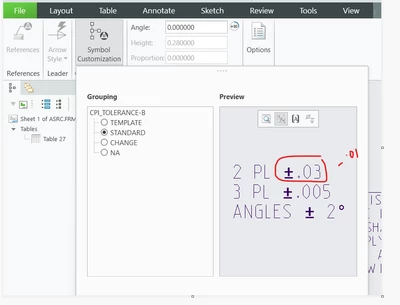
YogeshT_0-1769525280715.png


Best answer by Yogesh.T

I found: 

------------

Annotation

Annotations

Define Symbol

Redefine


2 replies

Dale_Rosema
23-Emerald III
23-Emerald III
January 27, 2026

Are you looking to change it on existing drawings? Your start drawings? A single drawing?

Yogesh.T14-AlexandriteAuthor
14-Alexandrite
January 27, 2026

The ECO say to change the mentioned list of drawings released in the system and make it standard for all initial drawing releases thereafter.

10-Marble
February 23, 2026

If you are applying a symbol that you might want to change later, it would be better to place the symbol into the template drawing not the drawing format.

Drawing formats are for things that remain fixed. i.e. grid references, Company Logo, Title Block etc.


Template drawings then contain the format plus additional things to help speed up drawing creation such as standard text notes, symbols, default views etc. These can all be changed or deleted as required.

Yogesh.T14-AlexandriteAuthorAnswer
14-Alexandrite
February 23, 2026

I found: 

------------

Annotation

Annotations

Define Symbol

Redefine
