
5-Regular Member
April 21, 2026
Question

How to prevent capping surface from being created for tapped hole feature in assemblies?

  • April 21, 2026
  • 1 reply
  • 27 views

Hi,
Would anyone know how to prevent Creo 10 from creating cap surfaces for tapped holes while using the Creo Parametric Hole feature?
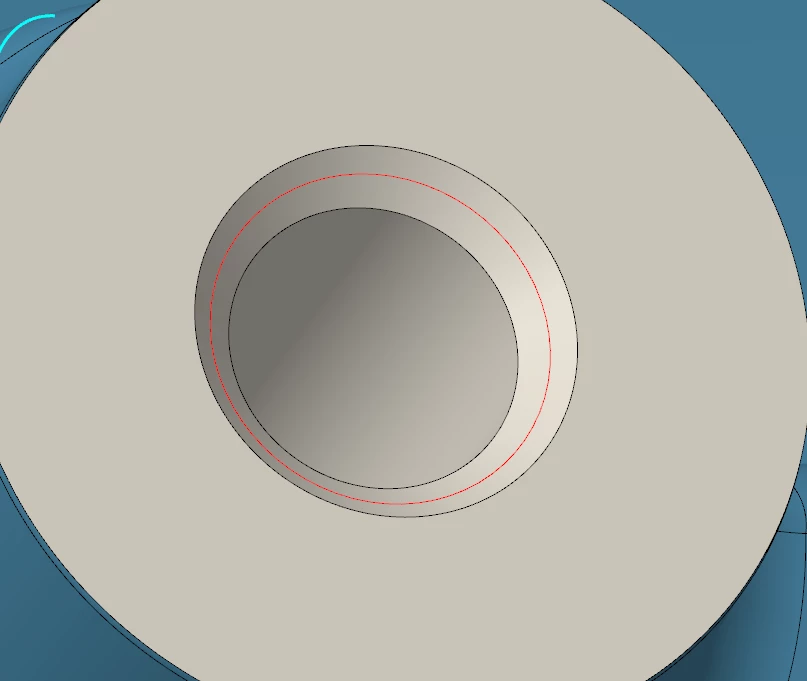
The surface shown in the image below is not the side wall of the thread but a cap surface at the top of the thread.  This makes you have to query select the hole which is an extra step when assembling parts to the tapped hole at the top-level assembly.
Thanks for any help you can provide,
Don A


1 reply

Patriot_1776
22-Sapphire II
April 21, 2026

“Cap surface”, you mean a countersink at the entrance?

5-Regular Member
April 21, 2026

The cap surface resides about halfway down the counter sink entrance as shown in the image below.


kdirth
21-Topaz I
21-Topaz I
April 21, 2026

That is an open cylindrical surface created to represent threads.  You can turn it off at hole creation.  Turn off add tapping button.


There is always more to learn.