1-Visitor
May 4, 2020
Solved

How to project a datum point onto a non planar surface?

  • May 4, 2020
  • 1 reply
  • 6107 views

Hello to all, 

how can I project a datum point onto a non planar surface? I tried to use datum point command but only allows project onto plane or planar surface.

If it is not possible, it there any workaround to accomplish it?

BTW, I´m using Creo 4.0.

Thanks.

Best answer by StephenW

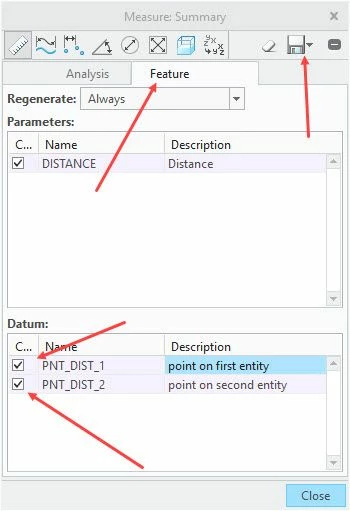
A different normal can be for each and every point on the surface. You may be able to get what you want by going to Analysis tab, measure, select the point and the surface, in the analysis dialog, box, select feature, then checkbox the datum points for both positions, and SAVE in the analysis box, you can accept the default name.

project.jpg

1 reply

StephenW
23-Emerald III
May 4, 2020

You can add an axis or sketch line that intersects the surface. The you can create the point at the intersection.

rcaetano1-VisitorAuthor
1-Visitor
May 5, 2020

It is not clear for me what you said. For instance I would like to project datum point highlighted on picture below onto surface. How can I do this?

StephenW
23-Emerald III
May 5, 2020
Create an Axis thru the point that that intersects the surface. Then create another point at using the point command, select both the axis and the surface.