3-Newcomer
July 31, 2024
Solved

how to remove layer tree?

  • July 31, 2024
  • 1 reply
  • 1841 views

Hi this is YJ


I'm using the creo 11 these day. every-things is better than creo 9.

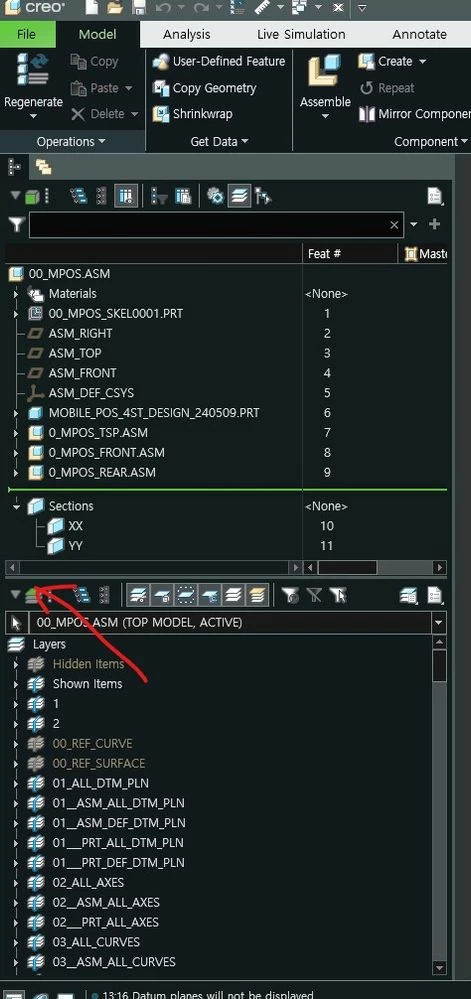
but i got problem on layer tree.

when i open the data i can see the layer tree every time.

even if I turn it off or change min size this. it come up on my screen every time.

somebody help me how to solve it.
 

화면 캡처 2024-07-31 131808.jpg

Best answer by kdirth

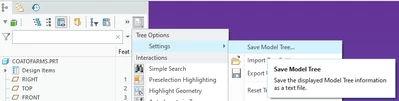
After closing the layer tree you need to save a tree settings file.

Select the Model Tree Settings icon, then Settings and Save Model Tree.

kdirth_1-1722429515834.png


1 reply

kdirth
21-Topaz I
kdirth21-Topaz IAnswer
21-Topaz I
July 31, 2024

After closing the layer tree you need to save a tree settings file.

Select the Model Tree Settings icon, then Settings and Save Model Tree.

kdirth_1-1722429515834.png


There is always more to learn.
yongjoo3-NewcomerAuthor
3-Newcomer
August 1, 2024

Thanks for reply.

i did as you said. save a tree setting and close creo program.

but still i can see the lay tree on new creo. how about your croe?

is it program burg?

yongjoo3-NewcomerAuthor
3-Newcomer
August 1, 2024

i found the problem.. my config file was wrong.

i used the configuration from creo ver 7.

so i removed the tree comand  and the problem was solved.

The problem was mine.

thanks anyway.