
15-Moonstone
November 16, 2020
Question

How to remove row based on value column from drawing table created from simple or 2d repeat region ?

  • November 16, 2020
  • 1 reply
  • 3741 views

Hi,

I have a family tabled part that I need to create multiple drawing tables from and each table will represent a different configuration of a part file (some features excluded, some not).
Based on a parameter called "configuration" and its value I want to exclude rows that are not related to a particular configuration. See the image below of the family table and 3 tables that I want to create from the family table.

How can I filter a simple repeat region to not include data related to an instance that belongs to a type of configuration?

How can I filter a 2d repeat region to not include data related to an instance that belongs to a type of configuration?
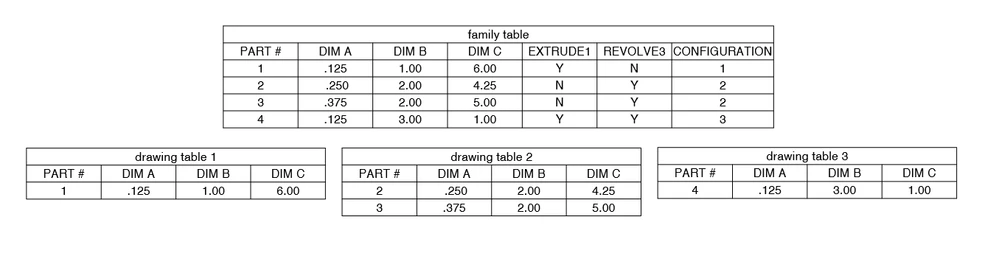
danders238_0-1605560482642.png


1 reply

24-Ruby III
November 17, 2020

@danders238 wrote:

Hi,

I have a family tabled part that I need to create multiple drawing tables from and each table will represent a different configuration of a part file (some features excluded, some not).
Based on a parameter called "configuration" and its value I want to exclude rows that are not related to a particular configuration. See the image below of the family table and 3 tables that I want to create from the family table.

How can I filter a simple repeat region to not include data related to an instance that belongs to a type of configuration?

How can I filter a 2d repeat region to not include data related to an instance that belongs to a type of configuration?

danders238_0-1605560482642.png


Hi,

please upload Creo files packed in single zip file.

15-Moonstone
November 18, 2020

Hi Marin,

Sorry for the delay!

Here's the files you asked for.


Thanks,

Don A


24-Ruby III
November 19, 2020

@danders238 wrote:

Hi Marin,

Sorry for the delay!

Here's the files you asked for.


Thanks,

Don A


Hi,

I think 2D repeat region is not the right way. Even simple repeat region containing fam items is not the right way.

It seems to me that the only solution is the following one:

  • create an auxiliary assembly containing all the family table instances
  • add the assembly into drawing as additional drawing model
  • set the assembly as active drawing model
  • create repeat region showing assembly components
  • set filter to display specific family table instances

See uploaded drawing.