

12-Amethyst
February 25, 2015
Question

how to report a number with conditionally-determined decimal places in a drawing

Hello,

I am experiencing a problem with reporting a number parameter (in my case a parameter of mass) with specific decimal places in a drawing.:

- I would like to plot the parameter with 1 decimal places if the mass is higher or equal to 1 kg.

- If instead the mass is lower than 1 kg, I would like to report it with 2 decimal places

I tried to set a conditional script (in the relations field) with functions like "if...ceil(),floor()" : but the problem is that in the drawing cell where I report the mass, I cannot set a conditional-formatted number of decimal places. I can set only 1 or 2, fixed:
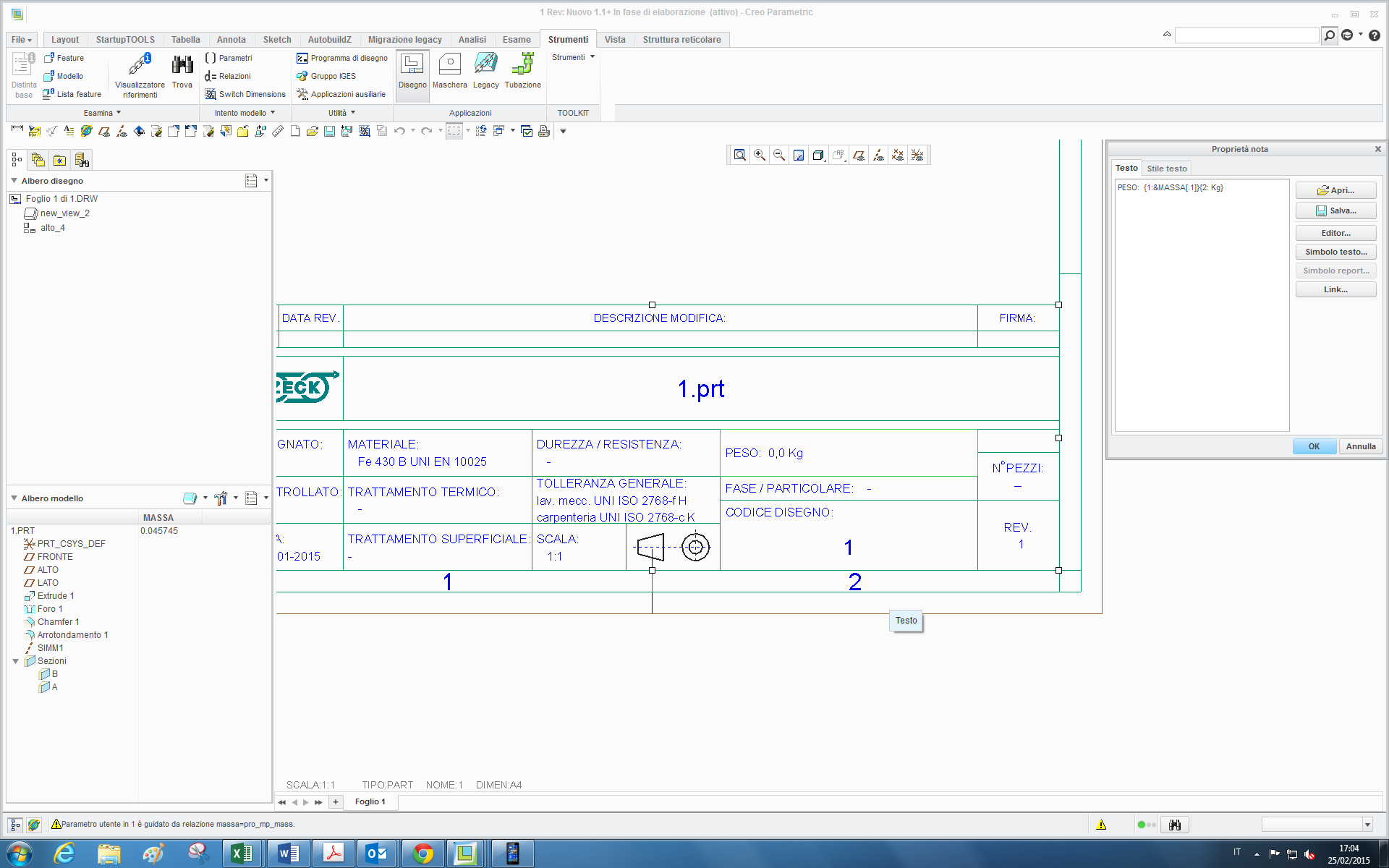
1.png

and therefore when the mass is higher than 1 kg (for example 2,6 kg) and I set 2 decimal places in the cell property window, it reports for example 2.60 kg (with a useless zero).

(and vice-versa if I set 1 dec. place with a mass lower than 1 kg, the system cuts out a decimal place).

thanks


This thread is inactive and closed by the PTC Community Management Team. If you would like to provide a reply and re-open this thread, please notify the moderator and reference the thread. You may also use "Start a topic" button to ask a new question. Please be sure to include what version of the PTC product you are using so another community member knowledgeable about your version may be able to assist.

22 replies

23-Emerald IV
February 28, 2015

The only way I know to do this is to create a single cell repeat region, add the appropriate relations to convert the mass to text, and then manipulate accordingly.

The repeat region parameter will initially be set to &mdl.param.value and a "by rule" filter will need to be added for your specific mass parameter. Something like &mdl.param.name == massa. This should display only the value for the mass in the repeat region. Next, add relations to the repeat region:

IF mdl_param_value >= 1

IF FLOOR(mdl_param_value) == FLOOR(mdl_param_value,1)

WEIGHT = ITOS(mdl_param_value) + ",0"

ELSE

WEIGHT = ITOS(FLOOR(mdl_param_value)) + "," + ITOS((FLOOR(mdl_param_value,1) - FLOOR(mdl_param_value)) * 10)

ENDIF

ELSE

IF mdl_param_value >= 0.10

WEIGHT = "0," + ITOS(FLOOR(mdl_param_value * 100))

ELSE

IF FLOOR(mdl_param_value,2) == 0

WEIGHT = "0,00"

ELSE

WEIGHT = "0,0" + ITOS(FLOOR(mdl_param_value * 100))

ENDIF

ENDIF

ENDIF

Finally, switch the repeat region cell parameter to point to your newly created relation parameter (WEIGHT in my example). &rpt.rel.WEIGHT

Note: The sample relations above always round down. You would need to modify them with additional IF statements if you want to round up and down.

Translate
KenFarley
21-Topaz II
March 2, 2015

Hey, I do a lot of this type of stuff for building part numbers, descriptions and the like using dimensions. This is the slightly more tricky way I have to get floating point numbers into text strings, with decimal places the way you want them:

IF FLOOR ( number ) < 1

WEIGHT = "0," + EXTRACT ( ITOS ( 100 * ( number + 1 ), 2, 2 )

ELSE

WEIGHT = ITOS ( number ) + "," + EXTRACT ( ITOS ( 10 * number ), 2, 1 )

ENDIF

The addition of 1 to "number" in the first IF clause ensures that multiplying it by 100 gets a number of the format 1XX, so extraction of the two digits of interest is guaranteed.

As stated in Tom's reply, you've got to add a bit of logic if you want to round up or down.

What I wonder is how a program can be more than 20 years old and still not have the functionality built in for converting floating point numbers to strings.

Translate
tleati12-AmethystAuthor
12-Amethyst
March 6, 2015

Hi,

thanks for your suggestions, they were both useful.

I inserted this script (massa_disegno is the parameter to print in the drawing):

if pro_mp_mass<1 & pro_mp_mass >= 0.0005

massa_disegno=itos(1000*pro_mp_mass) + " g"
else

if pro_mp_mass-floor(pro_mp_mass) < 0.05

massa_disegno=itos(floor(pro_mp_mass)) + ",0" + " kg"
endif

if pro_mp_mass-floor(pro_mp_mass) >= 0.95
massa_disegno=itos(ceil(pro_mp_mass)) + ",0" + " kg"
else

massa_disegno=itos(floor(pro_mp_mass)) + ","+ itos(10*(pro_mp_mass-floor(pro_mp_mass))) + " kg"
endif

if pro_mp_mass < 0.0005
massa_disegno="< 1 g"
endif

endif

Therefore at the end we decided to print the mass with this logic:

- part with mass lower than 1 g as --> " < 1 g"

- part with mass lower than 1 kg but higher than 1 gram as --> " xxx g "

- part with mass higher than 1 kg as --> " xxx,x kg "

and the script works!!

and...yes it's incredible how Creo is missing a function like this too, and above all there is no possibility to use "else if" so I have to make strange nestings!!

Translate
2-Explorer
March 6, 2015

PTC doesn't have conditional formatting. It also doesn't have a Real->String conversion, though it does have ITOS, so you could craft a set of relations to convert the Real to Whole / Fraction to String.

I think this should work, though some more effort may be required as I don't know what PTC does with INT->REAL conversions; if it truncates this works ok; if it rounds, then some extra work is required:

/*WHOLE and FRACTION are type INTEGER, MASSTEXT is type STRING

WHOLE = MASS

IF WHOLE > 1

FRACTION = (MASS-WHOLE)*10

ELSE

FRACTION =(MASS-WHOLE)*100

ENDIF

MASSTEXT = ITOS(WHOLE)+"."+ITOS(FRACTION)

Translate
KenFarley
21-Topaz II
March 6, 2015

That won't work, because of the idiosyncratic behavior of ITOS and the math in general:

(1) ITOS ( 0 ) = <blank string>

(2) ITOS ( 0.01 * 100 ) = ITOS ( 1 ) = "1", not what you're looking for.

Translate
2-Explorer
March 6, 2015

I missed the previous replies, which should be marked Correct by now, as the interface didn't expand all the comments when I asked to show more comments.

Thanks for fixing that. I'm new to CAD.

Translate