3-Newcomer
August 13, 2025
Solved

How to rotate dimension text

  • August 13, 2025
  • 2 replies
  • 2188 views

Hi,


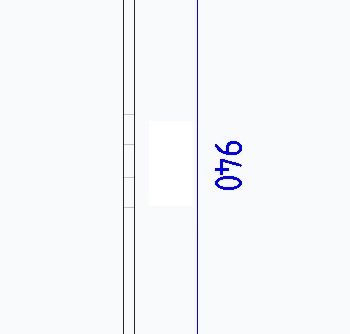
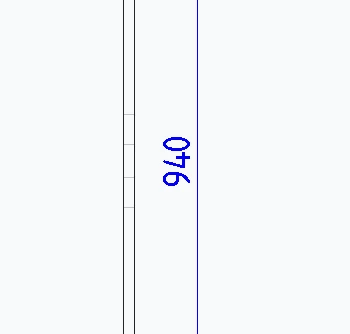
Is there a way to rotate the dimension text by 180°?


This is what I mean:

Old:
Screenshot 2025-08-13 145934.png

Rotated 180°:

Screenshot 2025-08-13 1459342.png


I saw someone suggest to rotate the view 180° in a previous post but this does not work for me.


We are currently working with Creo 10.


Kind regards,

Jaime

Best answer by Van_AG

2 replies

16-Pearl
August 13, 2025

You are in the wrong forum.


PTC has two CAD systems:    Creo+ and Creo Parametric    and     Creo Elements Direct.


Which makes it confusing.


More, for Creo Elements Direct:

- The 3D software name is Modeling, and

- The 2D software name is Drafting.


For Creo+ and Creo Parametric, use only this tab:

KotomEng_0-1755091037551.png


You should move your post to this community to have a better chance to get an answer.

To move your post, click on the three vertical dots on your initial post and click on "Notify Moderator".


vonGarlic3-NewcomerAuthor
3-Newcomer
August 13, 2025

You are correct, I will move the post!


Thank you for the feedback and instructions. 😊

Van_AG
15-Moonstone
August 14, 2025

i think it is not possible by config or dtl options.

The only way if the dimension line not vertical but a little bit slanted counterclockwise for example 0.1 degree

Then dimension text will be oriented automatically as you want 

vonGarlic3-NewcomerAuthor
3-Newcomer
August 14, 2025

Hi,

I tried the following based on your suggestion, but I don't get the solution I'm looking for.

Perhaps I'm doing something wrong, so below some images to show what I tried.

sa0.pngsa0_1.pngsa45.png


Is this what you meant?


Kind regards,

Jaime

Van_AG
15-Moonstone
August 14, 2025

Please see the attached video

I meant dimension line slant, not dimension text slant


This video has been deleted
(view in My Videos)