
15-Moonstone
December 23, 2021
Solved

How to rotate the number in surface finish symbols?
  • December 23, 2021
  • 5 replies
  • 3300 views

JS_9824412_0-1640275875879.png

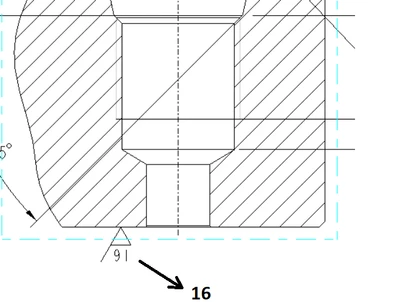
Is there a way to rotate the "16" text in the surface finish symbol?
Its properties has a box for angle but it stays grayed out. Is there a config
or something?


Here is the similar inquiry without an answer  https://community.ptc.com/t5/System-Administration/Rotating-surface-finish-symbols/m-p/113359. Hopefully someone in new generation know where the switch is. _THANKS!


Best answer by MartinHanak

Hi,

solution >>> create your own surface finish symbol.

5 replies

15-Moonstone
December 23, 2021

This is CREO 6

15-Moonstone
December 23, 2021

One quick-fix solution is to set the roughness value to be 91 so it can show as 16. This doesn't work for roughness 32.

JS_9824412_0-1640282872743.png

  ==>> 

JS_9824412_1-1640282941808.png


24-Ruby III
December 23, 2021

Hi,

solution >>> create your own surface finish symbol.

23-Emerald III
December 27, 2021

I have used the tangent leader option and selected no arrow or just used the leader option (depending on application).

16-Pearl
December 27, 2021

We copied the out of the box surface finish symbols from the load point and put them in our symbols directory. Inserting them as symbols allows them to rotate and function like normal. The OOTB symbols are located here: \Common Files\symbols\surffins. 


15-Moonstone
December 27, 2021

JS_9824412_0-1640631357130.png