
14-Alexandrite
December 4, 2024
Question

How to Save added Columns in Representation Editor Menue for Creo 8 Parametrics

  • December 4, 2024
  • 2 replies
  • 990 views

Hi 

I'm creating simplyfied Representations for large Assemblies using Creo 8.0.4.0 Parametrics.
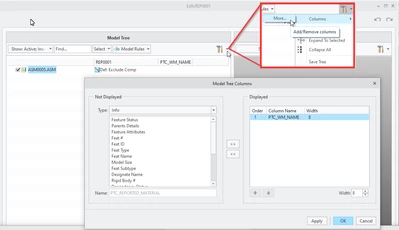
In the Representation Editor menu exists the option to add columns.

But if I add a column and then restart the PC, the added column is disappeared again.


How can I save the added column so that the column always remains?
 

Pius_0-1733306434994.png


Thank you in advance.
Pius

2 replies

Catalina
Community Moderator
December 10, 2024

Hi @Pius 

Thank you for your question. 

Your post appears well documented but has not yet received any response. I am replying to raise awareness. Hopefully, another community member will be able to help.

Also, feel free to add any additional information you think might be relevant. 


Best regards,

Catalina | PTC Community Moderator
joe_morton
18-Opal
18-Opal
January 17, 2025

I think changes like that should get saved to the UI file: https://www.ptc.com/en/support/article/CS288341?source=search


Do other menu changes get saved, or is it just changes to this menu? If no changes are getting saved at all, I would check to make sure the UI file is getting saved correctly. Per the article above, the default behavior would be to save the UI file here: %AppData%\PTC\ProENGINEER\Wildfire\.wf\.Settings\creo_parametric_customization.ui


Check to see if that exists. If maybe some system setting is preventing Creo from writing there, I would try setting the config below:

load_ui_customization_run_dir yes


Pius14-AlexandriteAuthor
14-Alexandrite
January 29, 2025

Hi Joe
Currently I transmitted your proposal for the saving of the ui file to my cad admin department.
They are now checking whether this is a option for all users. If so, they will implement this change to the creo_parametric_admin_customization.ui which in our environment seems to be the source for the user creo_parametric_customization.ui and the config.pro file.
All my attempts I made to test this locally, where cleared out again at the next cad start-up.
As soon as the modification has been installed by the cad admin, I will accept your proposal as the accepted solution.
Thank you so far, I hope it takes no time ....
Pius