
15-Moonstone
March 28, 2017
Question

how to set default option while inserting / importing DXF ?

  • March 28, 2017
  • 1 reply
  • 1919 views

Hi,


We want to set default option while importing/inserting DXF file in creo drawing. We want to set below options:

1. Import dimensions - as separate entities

2. Create variable sheet size

3. create multi-line text


and if DXF font not getting in creo then take isofont as default. so please someone can help me to do this setting

FYI. below snap shows required options.
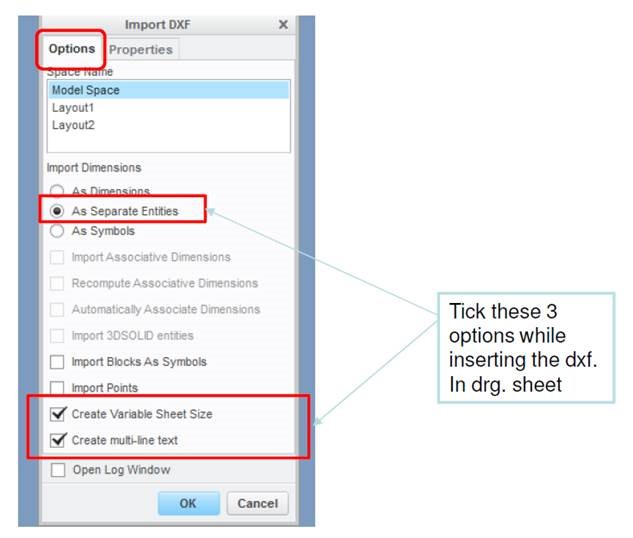
 

Capture.JPG

Thanks,

Prashant Pandarkar

1 reply

18-Opal
March 28, 2017

Hi Prashant,

When I import a DXF into a drawing, the Create Variable Size Sheet & Create Multi-line text options are already selected by default.  But I'm not sure if it is possible to specify the default option for Import Dimensions.

Thanks,

Amit

15-Moonstone
April 7, 2017

Hi Amit,

At my end only one option is got selected as default Create Variable size sheet, so have you done any setting to set as default for Create multi-line text and create variable size sheet.

Also I want to know currently whatever dxf not getting font it apply "font" as default so i want "isofint" instead of "font"

so please can you help.

Thanks,

Prashant

8-Gravel
April 12, 2017

Hi Prashant,

you can control the dialogue options with config entries as follows:

intf2d_in_dim AS_SEP_ENT --> imports dimensions as 2D elements, AS_IS would import "real" dimensions, AS_SYM would create a symbol out of every dimension

intf2d_in_create_multiline_note yes/no

intf_use_variable_size yes/no

There are lots more of other settings for this dialogue, just have a look at the configuration options:

BR,

Uwe