
5-Regular Member
December 5, 2025
Solved

How to show component placement dimension in assembly drawing?

  • December 5, 2025
  • 1 reply
  • 635 views

Hi,


I'm not able to show a component placement dimension (distance constraint) on an assembly drawing in Creo Parametric 10.  Would anyone know what config option needs to be changed or what I need to do to allow dimensions related to component placement to be shown?  I'm able to show dimension for feature internal to the part only.


Thanks for any help you may provide,

Don A
Best answer by kdirth

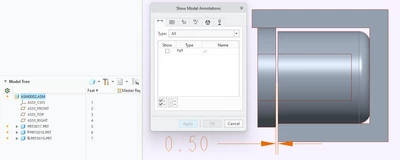
I am able to show an assembly dimension.


You can select the view then show dimensions to show anything in the top level.  You will have to select the subassembly to show anything at that level.

kdirth_0-1764969682782.png


1 reply

21-Topaz II
December 5, 2025

It's funny, but in years of using this program I've never noticed this behavior. Seems like the only way I can get a dimension to indicate, for example, the distance that was used to locate a part relative to another, is to add a dimension in the drawing.

If someone else has any advice about this I'll stand corrected.

5-Regular Member
December 5, 2025

The previous environments that I have worked in I was able to show the dimension on the drawings. So I figure there has to be a config.pro option or drawing dtl option that's preventing me from showing those dimensions.


Don A