
15-Moonstone
December 8, 2021
Solved

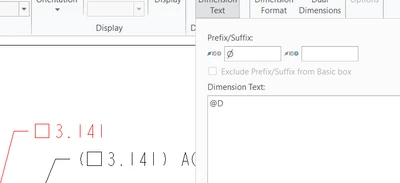
How to show diameter symbol? Right now the symbol is a box
  • December 8, 2021
  • 2 replies
  • 7835 views

JS_9824412_0-1638978396242.png

Why is the diameter symbol box shape? Wherever I dimension a round feature, it show this box as diameter symbol (and R as radius symbol). However, in a different drawing, the correct diameter symbol shows up but with bold font, which is another problem.


I have waited for several days before posting for help. Which configuration options should be checked?


Thanks.
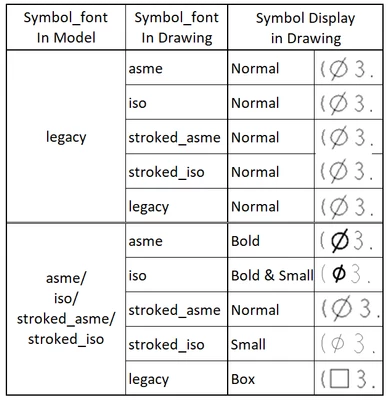
 

Best answer by JS_9824412

JS_9824412_0-1638985193294.png

The above is the outcome of my experiment upon Stephen's hint.

Please insert it into CREO's help manual (which is not user-friendly at all!)

2 replies

23-Emerald III
December 8, 2021

I assume this is an older drawing/model. Something changed several years ago that messed with fonts. I think the solution was this:


symbol_font legacy option must be set in both the model and the drawing.


Model
File > Prepare > Model Properties > Detail Options > change


Drawing
File > Prepare > Drawing Properties > Detail Options > change


I found the above info here:

https://community.ptc.com/t5/3D-Part-Assembly-Design/Symbol-Font-DTL-Option-does-not-apply-to-dimensions-only-to-text/m-p/547224


JS_982441215-MoonstoneAuthorAnswer
15-Moonstone
December 8, 2021

JS_9824412_0-1638985193294.png

The above is the outcome of my experiment upon Stephen's hint.

Please insert it into CREO's help manual (which is not user-friendly at all!)

15-Moonstone
December 8, 2021

What is the point to make it so complicated with so many traps? Was this PTC designer a hunter by nature?

15-Moonstone
December 8, 2021

JS_9824412_0-1638986404126.png

The above 4 issues have never been resolved since 11/2. Does anyone have a hint to set all captions of detail views in the same drawing to have the identical font configuration? Thanks.