4-Participant
December 9, 2025
Solved

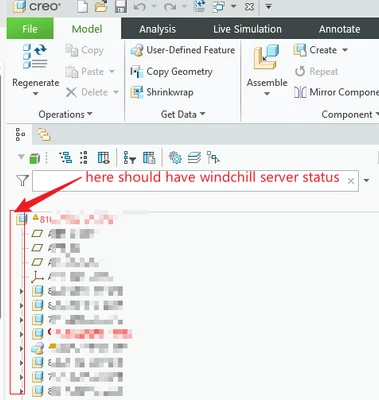
How to solve the problem of "Windchill Server Status" not displaying on the Creo model tree?
  • December 9, 2025
  • 2 replies
  • 478 views

LB_13010411_1-1765264662754.png


My colleague's computer can display windchill server status. My computer cannot display. How to set it to appear?

 

Best answer by kdirth

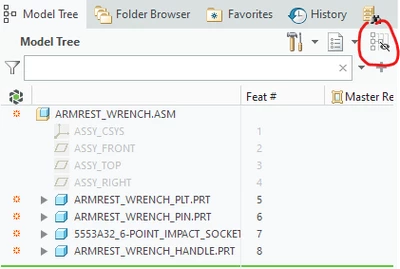
I only have Creo 7 connected to windchill.  For me this button controls showing columns.
kdirth_0-1765287739977.png

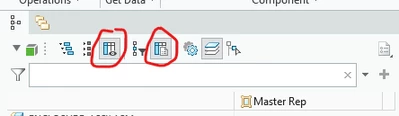
Looking at Creo+ (13), the first circled button controls the showing of additional columns and the second one controls which columns to show.
kdirth_1-1765288048124.png


2 replies

24-Ruby III
December 9, 2025

Hi,

is your Creo session connected to Windchill server?

4-Participant
December 9, 2025

Yes, it's already connected. The workspace can work normally.

24-Ruby III
December 9, 2025

@LB_13010411 wrote:

Yes, it's already connected. The workspace can work normally.


Hi,

I found following page https://support.ptc.com/help/creo/creo_pma/r12/usascii/index.html#page/fundamentals/fundamentals/About_Model_Tree_Status_Display.html

It seems to me that it tells me that windchill server status column is displayed automatically after connecting to Windchill server. I do not know whether it is possible to add this column manually.

kdirth
21-Topaz I
kdirth21-Topaz IAnswer
21-Topaz I
December 9, 2025

I only have Creo 7 connected to windchill.  For me this button controls showing columns.

kdirth_0-1765287739977.png

Looking at Creo+ (13), the first circled button controls the showing of additional columns and the second one controls which columns to show.

kdirth_1-1765288048124.png


There is always more to learn.
4-Participant
December 10, 2025

Great!

LB_13010411_0-1765358944306.png

LB_13010411_1-1765359014774.png