12-Amethyst
August 17, 2024
Solved

How to stop auto opening pdf after its generation from a dxf or dwg?

  • August 17, 2024
  • 1 reply
  • 1364 views

Hello all,

I'm encountering an issue while converting numerous DXF files to PDF format using a Creo Mapkey. The generated PDF automatically opens in another application, interrupting the Mapkey process. This behavior persists even after changing the default PDF application. Any alternative suggestion to avoid this will be much helpful. 
RG_10671499_0-1723899318806.png


Best answer by StephenW

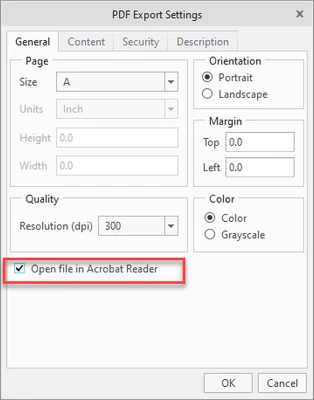
If you are using File - save as - save a copy to get your pdf, there is a box to turn off "Open file in acrobat" (i don't have acrobat, but it opens in my windows default PDF program). When I uncheck the box, there is no auto open.

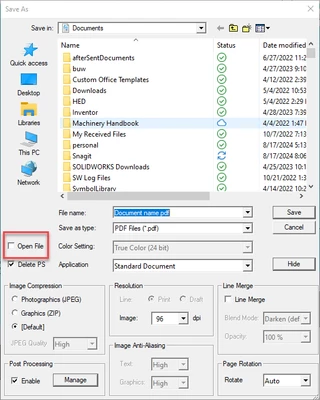
If you are using File - Print, That would be controlled by your PDF printer settings.  I attached my settings for my pdf creation software print settings screen, but yours will likely be different


You may need to step thru the PDF creation process manually (instead of mapkey) to find the click you will need to include in the mapkey or setting on your PDF software you will need to change.


StephenW_1-1723899985878.png


StephenW_2-1723900327012.png


1 reply

StephenW23-Emerald IIIAnswer
23-Emerald III
August 17, 2024

If you are using File - save as - save a copy to get your pdf, there is a box to turn off "Open file in acrobat" (i don't have acrobat, but it opens in my windows default PDF program). When I uncheck the box, there is no auto open.

If you are using File - Print, That would be controlled by your PDF printer settings.  I attached my settings for my pdf creation software print settings screen, but yours will likely be different


You may need to step thru the PDF creation process manually (instead of mapkey) to find the click you will need to include in the mapkey or setting on your PDF software you will need to change.


StephenW_1-1723899985878.png


StephenW_2-1723900327012.png


12-Amethyst
August 18, 2024

That is helpful. Thank you for your time and assistance.