
1-Visitor
January 5, 2022
Question

How to use a family table instance name in a family table (in the reference model column)

  • January 5, 2022
  • 10 replies
  • 8116 views

Hi all, looking for some assistance.

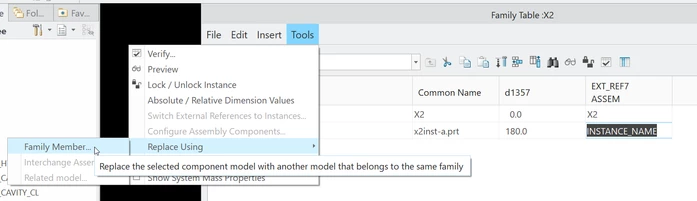
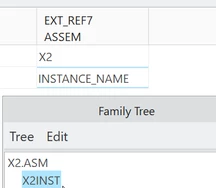
I have a need to use the name of a part in a family table, specifically in a cell of a "Reference Model" column.  The name needs to be from an instance of the part derived from this same family table.  The kicker is, family table editor allows adding the name BUT IT DOES NOT UPDATE if the instance is renamed.   The generic name at the top of the column updates as expected.  Below are the steps used to initial get the instance name into the cell.  Is there another way?  I've tried setting a parameter equal to the instance's part or assembly name and inserting the parameter in the family table cell.  This does not work, even though the value of the parameter updated correctly the family table apparently does not read the parameters value only the text of the parameters name.  Tried using PTC's parameter names for parts, assemblies and common names to no avail.  F.Y.I. I know this "Reference Model" column points to an assembly, the assembly instance needing to be referenced and the part instance in question will always have the same name.
 

MT_WashPA_0-1641413700535.png


MT_WashPA_1-1641413767442.png


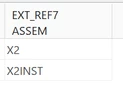
This updates the assemblies instance name in the parts family table cell but if the assembly instance is renamed the cell in the family table does not update.
MT_WashPA_2-1641413802084.png


Thanks in advance

MT_WashPA


10 replies

23-Emerald III
January 5, 2022

Are you using a PLM system, like Windchill?

What version of Creo are you using?

Can you upload your assembly and the family table?

MT_WashPA1-VisitorAuthor
1-Visitor
January 5, 2022

BenLoosli

Thank you for your attention.


No PLM in use (and none available).

Using Creo 4.0 m140

Models and drawing attached. Note the drawing was created and noted to show another problem, the cutout created in Creo 4.0 did not rotate in the family table instance even though the datum planes used to assemble the controlling model are rotated.  The cutout created in older versions does rotate as needed.  There is another thread for this problem.  Adding the "Reference Model" column in the parts family table fixed the rotation problem with the new cutout, these models have both cutouts old version (the lower) and Creo 4.0 (the upper).


19-Tanzanite
January 6, 2022

Hi @MT_WashPA , I tried on my system (M150 Creo 4), and if you rename the assembly instance by modifying the family table of the assembly's generic, then you can simply use that function "Switch External References to Instances" in the Tools menu to update the part's family table ref. model column with the new name of the assembly instance.

That all sure sounds very confusing when I read it out loud, but I hope it makes sense and works for you.


MT_WashPA1-VisitorAuthor
1-Visitor
January 6, 2022
I've tried the "Switch External References to Instances" with limited
success. Worked once but does not act like it's a permanent solution.
Will try again tomorrow.
21-Topaz I
January 6, 2022

Hello @MT_WashPA 


Please consider first that usage of Switch External References to Instances capability CREATES (and DOES NOTUPDATE) the Family Tree of Affected Component whose instance name was changed.

The components which have external references will be listed and those references will be proposed as new instances.

  • And this is therefore probably something you don't want


Then, please consider that this buisness need:

  • Is fully covered and supported in the scope of PLM systems, like Windchill:
    • This is due to the fact that PLM Systems ensure "Dependency Tracing" when doing things in Creo (Save as, Rename, etc ...)
    • This is illustrated in the little first demo attached with your files while Interacting with Windchill PDMLink 112.1
  • But is unfortunately not supported in standalone environments of Creo Parametric:
    • This is due to the fact that there is no notion of "Dependency Tracing" for things happening in Windows
    • Hence the reason why:
      • if a name changes in the structure of x2.prt (containing definition of the part family table)
      • It cannot be propagated AUTOMATICALLY to the structure of x2.asm file (containing definition of the assembly family table calling part instance)
    • Current limitation in standalone sessions is officially documented in article 63735 (behavior changed a bit in latest Creo versions, but limitation remains effective due to cause persisting and summarized above)
    • PTC provides a tool to do the required replacements in Assembly Family Table using the capability >Tools >Reconfigure Assembly Components >Replace with Family Table Instance
    • This capability is illustrated in second attached movie


Hope this helps to have a better understanding of what happens behind the scene, and how to proceed from now on to ensure semi-automatic (semi, because requires anyway manual actions) maintenance of Assembly Family Tables in the scope of Creo Parametric Standalone Sessions.


Regards,


Serge