12-Amethyst
March 5, 2025
Solved

How to use CREO software to create animated videos?

  • March 5, 2025
  • 3 replies
  • 975 views

How to use CREO software to create animated videos?Do you have any information to recommend?

Best answer by ZX_10618597

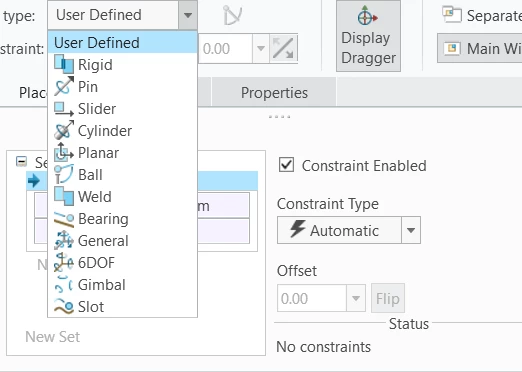
You can do this with mechanism function. You have to change the connection type in assembly.屏幕截图 2025-03-30 161541.png

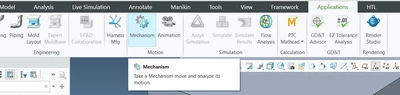
For example, for a rotating part choose pin. After that, go to applications, mechanism.

ZX_10618597_0-1743344318593.png

Add some servo motors and than do a mechanical analysis, than choose playback, now you can export as a mpeg video.


3 replies

Catalina
Community Moderator
March 5, 2025

Hi @Aurelian 


Thank you for your question! 


I’d like to recommend to bring more details and context to your initial inquiry. 

Please add screenshot(s) to better understand what you are trying to do in your process. 


Please refer to this guideline to make your questions more likely to receive a quick and useful answer. 

This will increase your chances to receive meaningful help from other Community members. 


Thank you for your participation and please let me know if you need further assistance! 


Best regards,

Catalina | PTC Community Moderator
12-Amethyst
March 30, 2025

You can do this with mechanism function. You have to change the connection type in assembly.屏幕截图 2025-03-30 161541.png

For example, for a rotating part choose pin. After that, go to applications, mechanism.

ZX_10618597_0-1743344318593.png

Add some servo motors and than do a mechanical analysis, than choose playback, now you can export as a mpeg video.


Community Moderator
April 4, 2025

Hello @Aurelian


It looks like you have a response from a community member. If it helped to answer your question please mark the reply as the Accepted Solution. 
Of course, if you have more to share on your issue, please let the Community know so other community members can continue to help you.

Thanks,
Vivek N.
Community Moderation Team.