
5-Regular Member
February 20, 2024
Solved

I don't have the option of dimension properties Creo 7.0.10.0
  • February 20, 2024
  • 2 replies
  • 1517 views

KP_10918554_1-1708441432406.png

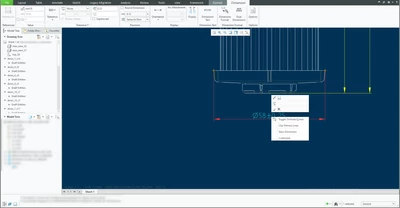
Hello, I would like you to help me with the following question, I have already reviewed the blog and the PTC community, however I cannot find a solution. I am trying to convert this dimension into an inspection dimension. Likewise, I have to use the properties of this dimension, I right clicked and this appears, only this option, (see picture)  I'm using 7.10.0.


I have seen on another blog that it is necessary to unlock it but I do not have that option, if someone can help me it would be of great. It toke a lot of my time.

 

Best answer by StephenW

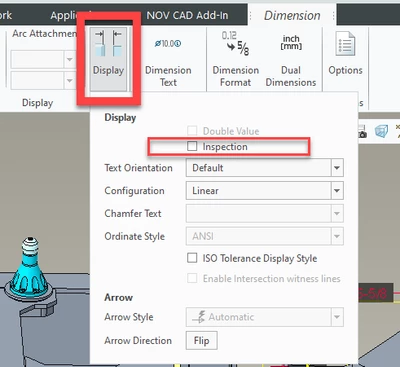
Everything in the dimension properties is now in the ribbon. Like @KenFarley mentioned.

Its not obvious the DISPLAY icon will expand.


StephenW_0-1708442553936.png


2 replies

21-Topaz II
February 20, 2024

Uncertain if you tried this already, but to make a dimension an "inspection" dimension, you use the "Display" function in the ribbon. There's a check box in the menu dialog that comes up that says "Inspection".

5-Regular Member
February 20, 2024

Thank you for your replay, Yes, I already have the measurement inspection measure, however I still need the dimension properties.

21-Topaz II
February 20, 2024

I don't understand what you are looking for. Making the dimension an "inspection" dimension  just puts a "racetrack" box around whatever you have defined as the dimension. You set up the way it looks with all the ribbon options, and the box surrounds it all.

StephenW23-Emerald IIIAnswer
23-Emerald III
February 20, 2024

Everything in the dimension properties is now in the ribbon. Like @KenFarley mentioned.

Its not obvious the DISPLAY icon will expand.


StephenW_0-1708442553936.png