
1-Visitor
January 18, 2017
Question

I have to merge two drawing file and replace solid model of added drawing with Main Drawing.

  • January 18, 2017
  • 1 reply
  • 4410 views


Hi


I am able to merge two drawing file but facing issue with replace solid model.


I have to replace solid model of added drawing.

I want to set Root Model to Each Drawing Sheet.
 

    Model_Change.PNG


Please find below code.

//Retrieve Model and Its Main Assembly


ProName _objFileName = L"imd253803.drw";


status = ProMdlRetrieve (_objFileName, PRO_MDL_DRAWING, &objCurrentMdl);


//Set it as current model


ProSolid objSolid;


status = ProDrawingCurrentsolidGet((ProDrawing)objCurrentMdl, &objSolid);


//Get Name of the solid


ProName objSolidName;


status = ProMdlNameGet (objSolid, objSolidName);


//Add Another Drawing


ProName objfilename_Next = L"imd253803_001a.drw";


ProMdl objCurrentMdl_Next;


status = ProMdlRetrieve (objfilename_Next, PRO_MDL_DRAWING, &objCurrentMdl_Next);


//Merge Second Drawing into Main


status = ProDrawingMerge((ProDrawing)objCurrentMdl, (ProDrawing)objCurrentMdl_Next);


ProMdl objCurrentMdl_Next_Again;


status = ProMdlRetrieve (objfilename_Next, PRO_MDL_DRAWING, &objCurrentMdl_Next_Again);


int Sheet_Next;


status = ProDrawingCurrentSheetGet((ProDrawing)objCurrentMdl_Next_Again, &Sheet_Next); 


status = ProDrawingCurrentSheetSet((ProDrawing)objCurrentMdl_Next_Again, Sheet_Next);


ProSolid objSolid_Next;


status = ProDrawingCurrentsolidGet((ProDrawing)objCurrentMdl_Next_Again, &objSolid_Next);


ProName objSolidName_Next;


status = ProMdlNameGet (objSolid_Next, objSolidName_Next);


  1. Approach – Here I getting - PRO_TK_E_NOT_FOUND


  status = ProDrawingCurrentsolidSet((ProDrawing)objCurrentMdl_Next_Again, objSolid);


status = ProDwgSheetRegenerate((ProDrawing)objCurrentMdl_Next_Again, Sheet_Next);


  1. Approach – Here I getting - PRO_TK_E_NOT_FOUND


status = ProDrawingSolidReplace((ProDrawing)objCurrentMdl_Next_Again, objSolid, objSolid_Next, PRO_B_TRUE);


Please do the needful.


1 reply

12-Amethyst
January 18, 2017

The difficulty here is when the documentation of ProDrawingMerge says the handle to the second drawing is lost, what it means is:  If you have two drawings in session, D1 and D2, and you call ProDrawingMerge(D1, D2), then afterwards you have one drawing in session, called D1, which has the original D1 plus the sheets from D2.  The D2 drawing in memory is destroyed and all its data merged into D1.  So when you ProMdlRetrieve D2 after, you are getting a new copy of D2 loaded from disk.  Changing the solid of this drawing does not do much useful for your final product.

I believe your intent is to take a drawing D1 of various instances of a part P1, and a drawing D2 of P1, and you wish to add to D1 a sheet which is 'D2, but P1 replaced by instance INST1 of P1'.  To do this, having D1 in memory:  retrieve D2, replace P1 -> INST1<P1> in D2, then ProDrawingMerge(D1,D2). Then, D1 has the desired content.

I hope this is helpful!

1-Visitor
January 19, 2017

Hi Matthew,

Thanks for your answer but It seems model is not update in second sheet.

Please find below code.

//D1 Drawing

status = ProMdlRetrieve( L"D1.drw", PRO_MDL_DRAWING , &obj_D1_Drawing);

//D1 Drawing's Solid Handler

status = ProDrawingCurrentsolidGet((ProDrawing)obj_D1_Drawing,&obj_D1_Drawing_Solid);  //Output : D1 Drawing

//D2 Drawing

status = ProMdlRetrieve( L"D2.drw", PRO_MDL_DRAWING , &obj_D2_Drawing);

//D2 Drawing's Solid Handler

status = ProDrawingCurrentsolidGet((ProDrawing)obj_D2_Drawing,&obj_D2_Drawing_Solid);  //Output : D2 Drawing

//Merge

status = ProDrawingMerge((ProDrawing)obj_D1_Drawing, (ProDrawing)obj_D2_Drawing);

//Retrive Merge Drawing - D1

status = ProMdlRetrieve(L"D1.drw",PRO_MDL_DRAWING, &obj_D1_Drawing);

//Save

status = ProMdlSave((ProDrawing)obj_D1_Drawing);

//Now I have to replace all drawing sheet handler with "D1 Drawing"for that I am getting error.

//I am using below approach for replace handler to all sheet

status = ProDrawingSolidAdd((ProDrawing)obj_D1_Drawing,obj_D1_Drawing_Solid);

status = ProDrawingCurrentsolidSet((ProDrawing)obj_D1_Drawing,obj_D1_Drawing_Solid); //Here It is added but not update in drawing sheet..Please suggest

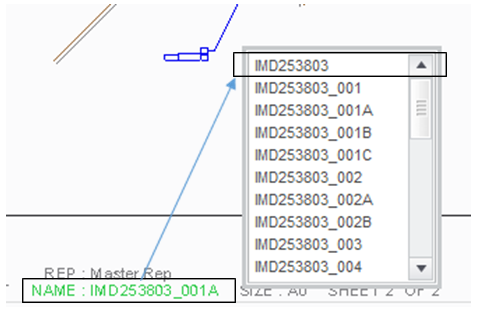
Here in below snap - After merge I want to replace model "Name" in sheet which is in Green Color (D2_Drawing) with D1_Drawing.

Please do the needful.

1-Visitor
January 19, 2017

You can give a try using API "ProDwgSheetRegenerate()." after ProDrawingCurrentsolidSet.

HIH,

Ketan