5-Regular Member
June 5, 2025
Solved

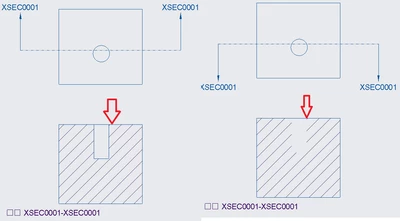
if I do "flip material removal side" after make section and arrows
  • June 5, 2025
  • 2 replies
  • 584 views

flip material removal side.png

I am using Creo Parametric Release N/A and DatecodeN/A

if I do "flip material removal side" after make section and arrows

the lines are gone..

Best answer by MartinHanak

... additional note.


Edit view definition set Hidden line display instead of No hidden.

2 replies

24-Ruby III
June 5, 2025

Hi,

this is because the x-section plane is hidden behind the material.

24-Ruby III
June 5, 2025

... additional note.


Edit view definition set Hidden line display instead of No hidden.

21-Topaz II
June 5, 2025

You don't indicate what version of Creo you are using, but judging from the behavior it is probably an older one. This kind of thing would happen all the time if I switched the material side. The only surefire way I found to fix it was to turn off or remove the section activation in the view, then re-activate it.