6-Contributor
April 9, 2025
Solved

IFX Fastener placement references failure

  • April 9, 2025
  • 1 reply
  • 1289 views

Hi all,


I have been trying to create a library of parts for our company to use via Windchill. I have created all the parts via the instance creator and they all generated correctly and worked with the IFX tool when the files were local. 


I then uploaded the files for all the components onto Windchill and it worked fine for a week or so. However, I have now run into an issue where the button head fasteners and nuts don't assemble via the tool for an unknown issue. 


Looking into the error note it says the placement references are failing to work properly but I can't find anything different in the .dat files compared to other fastener files which are still working as intended. 
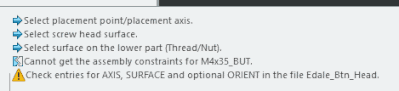
Error-Note.gif

CH_9983923_0-1744190313582.png


They can be assembled manually from their location on Windchill so the parts work, just seem to fail when trying to use them with IFX. 


I've attached the fastener .dat files used below on Creo 8.0.


Please let me know if there is a fix to get those files working as they are already integrated into some assemblies already so would rather alter them than have to create new instances if possible. 


Many thanks

Best answer by OliverGräbner

Hi,


in your file 'EDALE_BTN_HEAD.dat' you specifiy the SURFACE=28 and AXIS=486.

I could found the SURFACE but not the AXIS inside your 'EDALE_BTN_HEAD.prt' file.


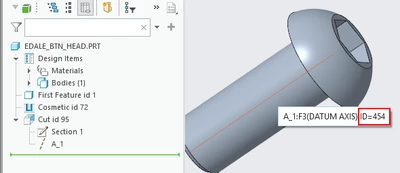
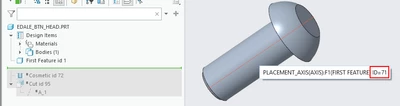
I could found an Axis with ID=454 and an axis with ID=71.

The ID of the 'A_1' axis feature is 451.

axis_454.png

axis_71.png


But I could not find an axis with id 486.

can you please try it again by using the AXIS=454.


1 reply

17-Peridot
April 9, 2025

I had a look to your dat files.

Please remove the additiional tabs and spaces at the end of your SURFACE and AXIS entry.

Make sure that the ids are correct and exist in you windchill fastener part.

screenshot_20250409_112515.png

screenshot_20250409_112557.png


It is also possible to  specify a name instead of an id.

Use creo option 'show_selected_item_id' set to yes to get the id of the surface and the axis in the tooltip.

See also: Fastener Data Files - Placement References 

! Placement References
SURFACE 124 -12 PLACEMENT_SURFACE
AXIS 341 24 PLACEMENT_AXIS


I always recommend to edit the *.dat files with Notepad++ and display Tabs and Spaces.

The Plugin 'Columns++' with Elastic tabstops is also very handy.


6-Contributor
April 10, 2025

Hi Oliver,


Thank you for the response and answers. 


This has solved the problem with the nuts, however this has not helped with the button head screws. 


I went through the file on Notepad++ like you suggested and removed the extra tabs and spaces.

I also tried changing the axis that it relates too by adding a new axis and updating the table accordingly but that didn't have an effect either, 

The button head is also still failing to update the catalogue on windchill and not sure whats going on with that. 


Many thanks


17-Peridot
April 11, 2025

Hi, 


do you still get the message regarding 'AXIS, SURFACE, ORIENT' or do you have another problem?


Does the problem occure with all instances or only with some special sizes?

E.g. the 'M5x40_BUT' was created from another template than the 'M10x20_BUT' and has different reference ids.


Please send me a screen shot of your IFX fastener dialog and the trail.txt file, and some of your instances, the I will try it on my end where the problem is.