
1-Visitor
June 3, 2020
Solved

Import Inventor Part_Assemblies_Datums

  • June 3, 2020
  • 1 reply
  • 1683 views

Helo,

I have imported an Inventor assembly but the Datums, planes, axis etc. there not visible. 


  • I have tried to setup the import profile, File > Options > Data Exchange > import and open profiles. I have set up a new profile using Template (creo), unfortunately with no effect.
  • If Edit definition > IDD the import part, with the component, surface group the are also the datums , but they aren't visible in the model tree. As shown in the picture bellow.
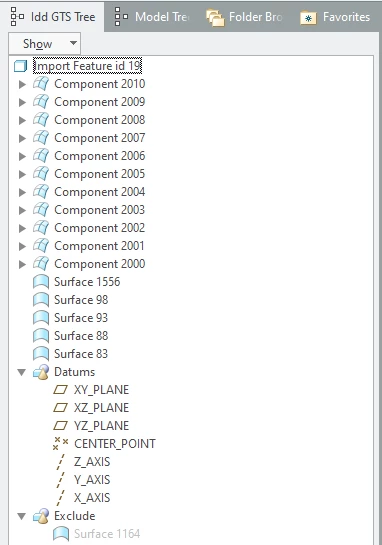
Capture1.PNG

Is there a procedure to make them visible in the model tree? 
Is there any other more proper way to import the files?


Thank you in advance 

Apostolis

Best answer by Tdaugherty

Hi,


Can you check to see if the datums are hidden on a layer? If it is, unhide the layer and save the layer tree status.


Also, you may just want to make new datums based on your preferred coordinate system. The ones you have are collapsed into the import feature and won't be accessible from the model tree. 


Ty

1 reply

16-Pearl
June 3, 2020

Hi,


Can you check to see if the datums are hidden on a layer? If it is, unhide the layer and save the layer tree status.


Also, you may just want to make new datums based on your preferred coordinate system. The ones you have are collapsed into the import feature and won't be accessible from the model tree. 


Ty

agompakis1-VisitorAuthor
1-Visitor
June 4, 2020

@Tdaugherty  Thank you for your responese. 


  1. Before i Create the importing templates, i was already imported the files thats why the newly created templates was not working. 
     
     You can change the import type only during the initial import of the model. If you change the import type of the models when you reload or replace the source files or add and redefine geometry, the imported features ignore the setting and retain their original geometry type set during its initial import.
  2. It was hidden on the Layers the error message was says that can not show more than 500, thus i delete some Datum Axis,the Datum Planes was visible, with out names.I'm not very fond to create new Planes on the original part Planes, down the road for sure i will encounter problems.
  3. I deleted all the files with .ipt.creo & iam.creo and import the assembly with Inventor templates and all the Datums worked as expected. But i had some problems with the Pleasment of several components wich i manualy place them.