tbraxton
22-Sapphire II
October 7, 2022
Solved

Import of a drawing into another drawing strips tolerances from dimensions

  • October 7, 2022
  • 1 reply
  • 1848 views

I have a drawing which is applicable to multiple designs that use it. Creo supports import of a drawing into another drawing.  Importing this reference drawing into a new design works well except for the fact that all tolerances are removed from the dimensions when it is imported into another drawing.


Any ideas on why Creo is removing the tolerances upon import?


Creo 7.09
tbraxton_2-1665138795430.png


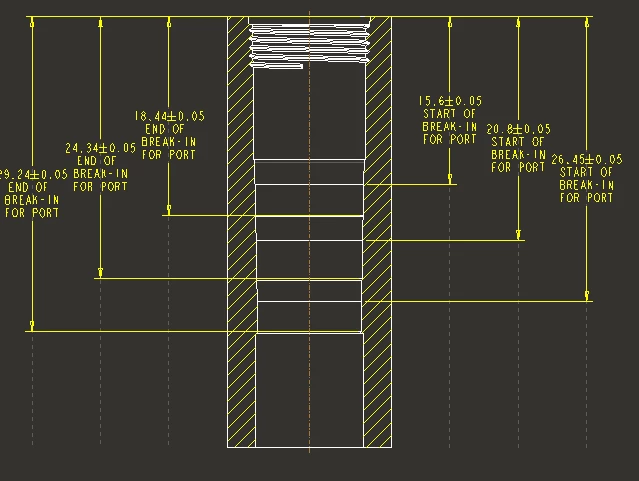
Ref drawing view:

tbraxton_0-1665138633061.png


Same view when the ref drawing is imported into a new drawing (no tol display).
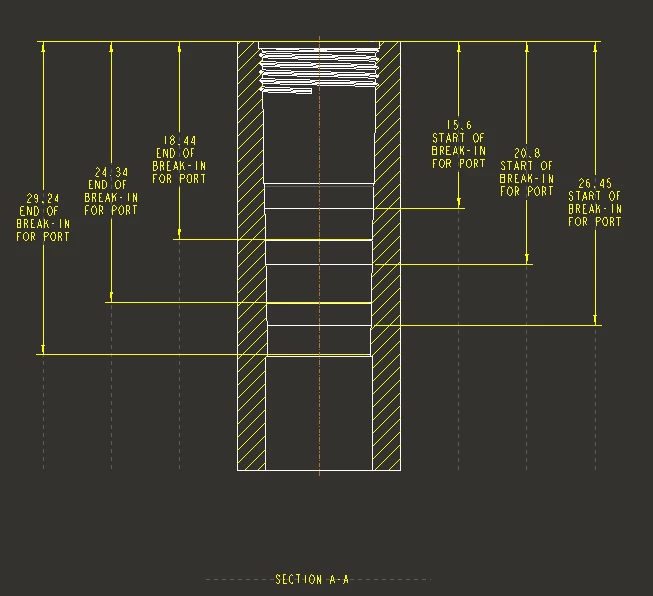
tbraxton_1-1665138691152.png


Best answer by MartinHanak

Hi,

please check whether tol_display YES is set in both drawings.

1 reply

24-Ruby III
October 7, 2022

Hi,

please check whether tol_display YES is set in both drawings.

tbraxton
tbraxton22-Sapphire IIAuthor
22-Sapphire II
October 7, 2022

This detail file setting was the cause. It was set to no in the target drawing, once set to yes, the tolerances are displayed.