
1-Visitor
March 25, 2017
Solved

Import sketch to new part (Creo 3)

  • March 25, 2017
  • 5 replies
  • 13506 views

Hi there,

When I save a sketch as a .sec file and go to my new part, enter sketch mode - there's nowhere to import the sketch?? The tutorial for CREO 2 says there's a 'File System' dialogue but this doesn't seem to be present in Creo 3, help please!!

Best answer by StephenW

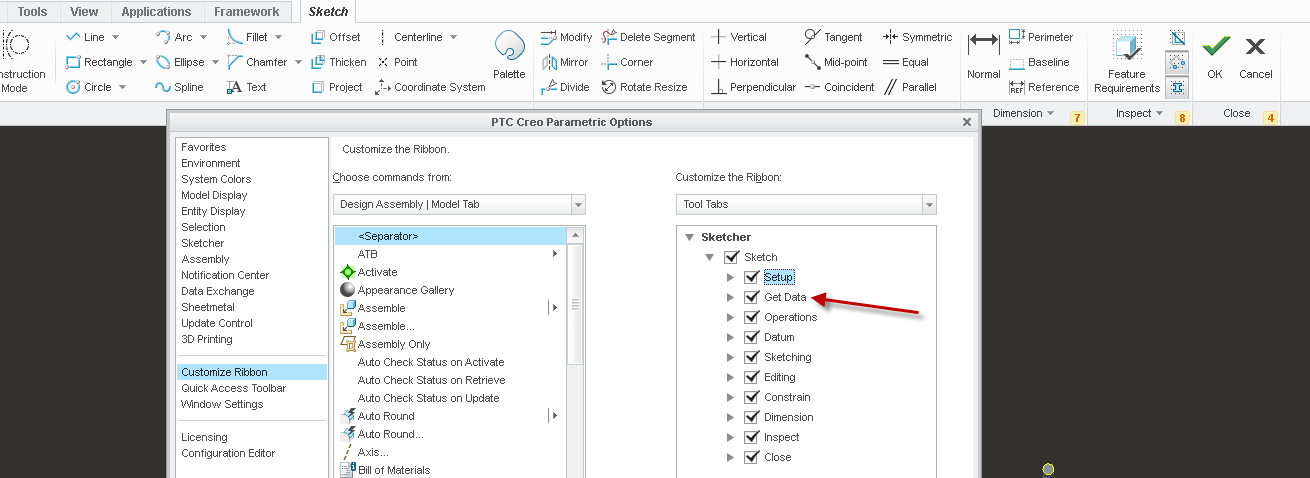
The tab is missing the Get data option.

In the sketch on the ribbon, right click and select CUSTOMIZE THE RIBBON.

Add the option for Get Data. Not sure why it was not there in the first place but I've notice that the educational version "simplifies" the menus sometimes.

5 replies

StephenW
23-Emerald III
March 25, 2017

It's when you have started the sketch.

jlean1-VisitorAuthor
1-Visitor
March 25, 2017

There's no 'File System' option for me. I'm running PTC Creo Parametric

CreoSketch.png

StephenW
StephenW23-Emerald IIIAnswer
23-Emerald III
March 27, 2017

The tab is missing the Get data option.

In the sketch on the ribbon, right click and select CUSTOMIZE THE RIBBON.

Add the option for Get Data. Not sure why it was not there in the first place but I've notice that the educational version "simplifies" the menus sometimes.

14-Alexandrite
March 25, 2017

25-03-2017 12-51-05.png

It should be available in sketch, if not, try to search for it on search tab.