
5-Regular Member
May 31, 2023
Question

Import validation failure

  • May 31, 2023
  • 3 replies
  • 2606 views


Hi....


While importing any neutral format parts (parasolid,stp,igs etc.. ) i am facing an issue import validation failure and my part file converted as a solid file. Why the creo can't heal the surfaces automatically. and even i create a step file by creo and again i tried to open that file in the same creo software but i am facing the same issue.              

Note: Already the part is accepted as a solid part by creo but i try to save as a step and tried to open again in the same part in the same creo. Why it converted as error surface body??


Please give me a proper solution for this. I spent a lot of time on repairing the file by IDD but i Cant


Please give any automatic solution if have.
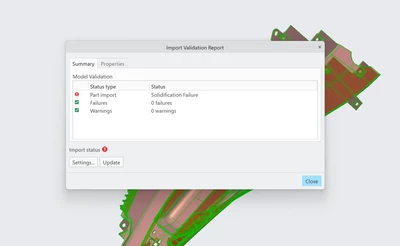
 

RR_10572109_0-1685509707784.png


Thankyou 


Ramaniedharan R

Designer-Plastic


3 replies

24-Ruby III
May 31, 2023

Please specify which version of the program you are using.

5-Regular Member
May 31, 2023

I am using the current version 

Patriot_1776
22-Sapphire II
May 31, 2023

If you can, bring it into Solidworks, heal it there (if needed), then open it in Creo
(it should let you open the file), then save it out as a STEP.  Solidworks has a WAY better healer than Creo, that's what I use it for.

5-Regular Member
June 1, 2023

I don't have solidworks. And the issue is about data lose. Even i change the solid file of creo also i am facing this issue.

19-Tanzanite
June 1, 2023

There are many options available for tuning the algorithm used by Creo when importing the external STEP, X_T, etc.. data.

What have you tried?  I found some useful suggestions in this thread:


Importing STEP files


2nd, please clarify - are you saying that you have a solidified part but Creo is still complaining and throwing that "validation failure" message?

In that case, there is a fairly simple fix.