
1-Visitor
November 6, 2025
Solved

In Creo 10 Change Coordinate system while exporting in STP not possible (possible in Creo 7)

  • November 6, 2025
  • 2 replies
  • 612 views

Hello All,


In Creo 7 when saving as a STEP, I was able to select the coordinate system in the window shown in the attachment but in Creo 10 the button stays greyed.

Does anybody know why this is ?


Best answer by Chris3

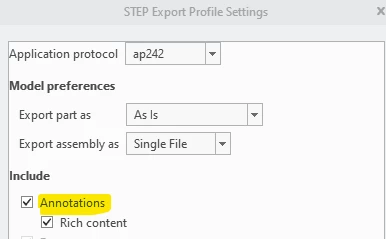
Most likely because you are exporting annotations. Uncheck exporting annotations in the step options.
 

Screenshot 2025-11-06 111119.png

2 replies

16-Pearl
November 6, 2025

Hi @VD_10406408 ,


Perhaps you could share some additional details or an example model.  Does this happen for all of your models in Creo 10 or just a specific one?


I attempted to create a STEP export using all of the protocols, part, assembly, even a part and assembly without any coordinate system and I had access to this selector in every attempt.


Mike

Chris3
Chris321-Topaz IAnswer
21-Topaz I
November 6, 2025

Most likely because you are exporting annotations. Uncheck exporting annotations in the step options.


Screenshot 2025-11-06 111119.png

1-Visitor
November 7, 2025

Thank you, did the trick