6-Contributor
June 3, 2022
Solved

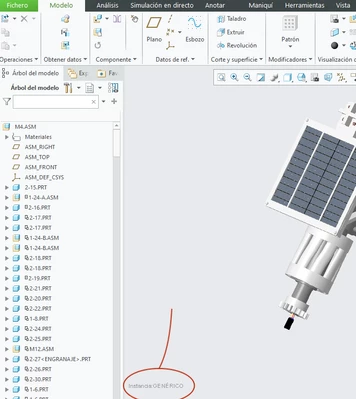
Is is possible to hide these text?
  • June 3, 2022
  • 4 replies
  • 4215 views

Captura de Pantalla 2022-06-03 a las 18.54.28.png

Hi, i would like to ask if is possible to hide the text that I have surrounded by the red circle.

thanks.

Best answer by tbraxton

Try setting the text color to match the background, it will then "disappear".


  • ​In Creo Parametric, the color of the texts is controlled by Secondary highlight, click  File > Options System Colors > Graphics. Change the color of Secondary highlight to the same color of Background

4 replies

23-Emerald III
June 3, 2022

It is, but not sure what the settings is.

It is someplace under File-Options and then in one of the setting pages for display, assembly or environment.

I am guessing, since I can't rad the text, that you are talking about the rep or instance name.

6-Contributor
June 3, 2022

I is referid to the generic component of a family table.

 I can not find where can I hide these text.

tbraxton
22-Sapphire II
22-Sapphire II
June 3, 2022

Are you wanting to temporarily hide the text or configure the environment so that it never appears in the graphics window?

tbraxton
22-Sapphire II
22-Sapphire II
June 3, 2022

If you want to save an image of the graphics window without that text then try the temporary shade option. It should work for instance names and other text in the graphics window.


tbraxton_0-1654285501180.png


6-Contributor
June 4, 2022

I tried it, but the text apear while you build a animation

6-Contributor
June 4, 2022

thanks for your answers, I need to hide the text in a animation

24-Ruby III
June 4, 2022

Hi,

I think it is not possible to turn off the text. To be sure, please ask PTC Support.
